> ## Documentation Index
> Fetch the complete documentation index at: https://docs.livepeer.org/llms.txt
> Use this file to discover all available pages before exploring further.
# Network Participation
> How Livepeer protocol governance works and how orchestrators vote on Livepeer Improvement Proposals (LIPs) – finding polls, voting via livepeer_cli, verifying your vote on Explorer, and where to follow active proposals.
export const CustomDivider = ({color = "var(--lp-color-border-default)", middleText = "", spacing = "default", style = {}, className = "", ...rest}) => {
const spacingPresets = {
default: {
margin: "24px 0"
},
overlap: {
margin: "-1rem 0 -1rem 0"
},
tight: {
margin: "0 0 -1rem 0"
},
section: {
margin: "0 0 -2rem 0"
},
sectionOverlap: {
margin: "-1rem 0 -2rem 0"
},
deepOverlap: {
margin: "-1rem 0 -1.5rem 0"
}
};
const spacingStyle = spacingPresets[spacing] || spacingPresets.default;
return
{middleText && <>
{middleText}
}
;
};
export const TableCell = ({children, align = "left", header = false, style = {}, className = "", ...rest}) => {
const Component = header ? "th" : "td";
return
{children}
;
};
export const TableRow = ({children, header = false, hover = false, style = {}, className = "", ...rest}) => {
const rowId = `table-row-${Math.random().toString(36).substr(2, 9)}`;
return <>
{hover && }
{children}
;
};
export const StyledTable = ({children, variant = "default", style = {}, className = "", ...rest}) => {
const wrapperVariants = {
default: {
border: "1px solid var(--lp-color-border-default)",
backgroundColor: "var(--lp-color-bg-card)",
overflow: "hidden"
},
bordered: {
border: "2px solid var(--lp-color-accent)",
backgroundColor: "var(--lp-color-bg-page)",
overflow: "hidden"
},
minimal: {
border: "none",
backgroundColor: "transparent",
overflow: "visible"
}
};
return ;
};
export const StyledStep = ({title, icon, titleSize = 'h3', iconColor = null, titleColor = null, children, className = '', style = {}, ...rest}) => {
const styledTitle = titleColor ? {title} : title;
return
{children}
;
};
export const StyledSteps = ({children, iconColor, titleColor, lineColor, iconSize = '24px', className = '', style = {}, ...rest}) => {
const resolvedIconColor = iconColor || 'var(--accent-dark, #18794E)';
const resolvedTitleColor = titleColor || 'var(--lp-color-accent)';
const resolvedLineColor = lineColor || 'var(--lp-color-accent)';
return ;
};
Livepeer is a protocol governed by its token holders. Your vote carries weight proportional to your total stake – including the delegated LPT entrusted to you by your Delegators. When you vote on a proposal, you are voting on their behalf as well as your own.
Use this page to follow active proposals, cast a vote with `livepeer_cli`, and verify the result on Explorer.
## How Livepeer governance works
Protocol changes are proposed through **Livepeer Improvement Proposals (LIPs)**. A LIP changes protocol parameters such as inflation floors or treasury allocation, and it introduces features such as remote signers, AI pipeline support, or clearinghouse architecture.
The process follows a defined path:
```icon="terminal" theme={"theme":{"light":"github-light","dark":"dark-plus"}}
Author drafts LIP on GitHub (livepeer/LIPs repository)
↓
Community discussion in Livepeer Forum + Discord
↓
Foundation or community creates on-chain poll via Explorer
↓
Voting window opens - orchestrators cast votes on-chain
↓
Outcome determined by stake-weighted vote count
↓
Accepted LIPs are implemented in go-livepeer and protocol contracts
```
Governance is **stake-weighted**. A vote from an Orchestrator with 100,000 LPT total stake carries far more weight than one with 1,000 LPT. Delegators represented by their Orchestrator's vote care about governance participation for the same reason.
### Recent LIPs affecting Orchestrators
The following LIPs have changed conditions for active Orchestrators since 2024:
LIP
What changed
**LIP-89**
10% of each round's LPT inflation now goes to the Livepeer Treasury before distribution to Orchestrators
**LIP-73**
Treasury governance established – LPT accumulated in treasury is governed by token holders via proposals
**LIP-91 / LIP-92**
AI pipeline support formalised in the protocol, AI inference fee parameters introduced
Check [github.com/Livepeer/LIPs](https://github.com/livepeer/LIPs) for the complete, versioned proposal history.
## Where to follow governance
Stay informed before you vote. Proposals change economic conditions – voting without context is a governance risk.
Active and past on-chain polls. Find poll contract addresses here.
Where LIPs are discussed before going on-chain. Core governance deliberation happens here.
Versioned proposal text, rationale, and specification for every LIP.
The **#governance** channel on the [Livepeer Discord](https://discord.gg/livepeer) is the fastest-moving discussion space. For formal, searchable, long-form governance discussion, the Forum is the primary venue.
## How to vote
Voting requires your Orchestrator node to be running. `livepeer_cli` signs through your local node, so private keys stay on the node.
Go to [explorer.livepeer.org/voting](https://explorer.livepeer.org/voting). Find the active proposal you want to vote on.
 The poll page shows the proposal description, voting period, current vote tally, and a prompt to vote via `livepeer_cli`. Note the **poll contract address** – you will need it in the next step.
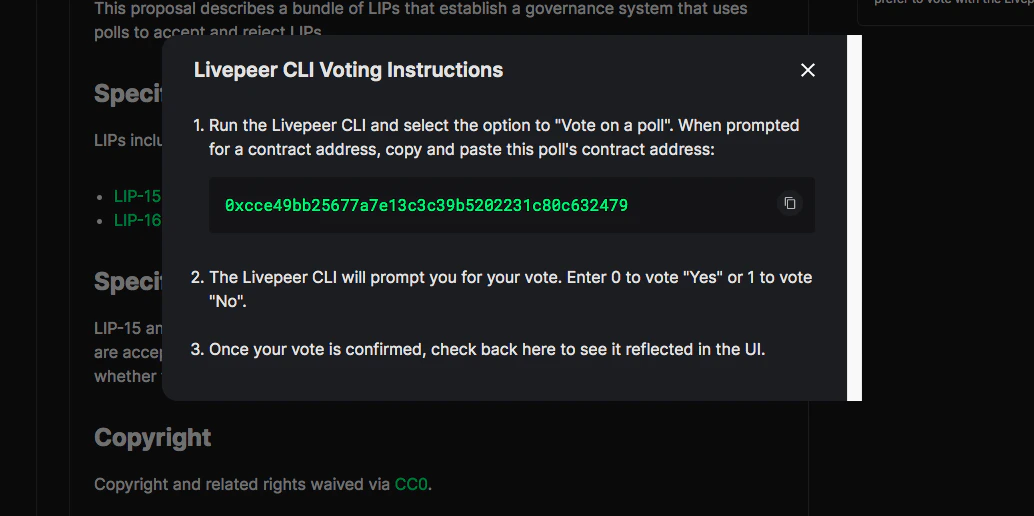
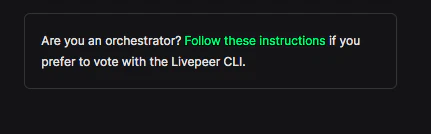 Click "Follow these instructions" to display the CLI steps, which also confirm the contract address for this specific poll.
 `livepeer_cli` connects to your running node to sign the transaction. Your Orchestrator must be active before running the CLI.
```bash icon="terminal" title="Confirm the node is running" theme={"theme":{"light":"github-light","dark":"dark-plus"}}
# Confirm your node is running (example - adjust for your setup)
docker ps | grep livepeer
# or
systemctl status livepeer
```
```bash icon="terminal" title="Open livepeer_cli" theme={"theme":{"light":"github-light","dark":"dark-plus"}}
livepeer_cli
```
Nodes running on a non-standard port use:
```bash icon="terminal" title="Open livepeer_cli on a custom port" theme={"theme":{"light":"github-light","dark":"dark-plus"}}
livepeer_cli -http 127.0.0.1:7935
```
From the CLI menu, enter the number corresponding to **"Vote on a poll"**.
```text icon="terminal" title="Poll contract prompt" theme={"theme":{"light":"github-light","dark":"dark-plus"}}
Enter the contract address for the poll you want to vote on ->
```
Paste the poll contract address you copied from Explorer in Step 1.
The CLI shows:
```text icon="terminal" title="Voting options" theme={"theme":{"light":"github-light","dark":"dark-plus"}}
Identifier Voting Options
0 Yes
1 No
```
Enter `0` for Yes or `1` for No, then confirm:
```text icon="terminal" title="Vote confirmation prompt" theme={"theme":{"light":"github-light","dark":"dark-plus"}}
Enter the ID of the option you want to vote for -> 0
Are you sure you want to vote "Yes"? (y/n) -> y
success
```
Your node submits the vote transaction on-chain. You will see the transaction hash in the logs:
```text icon="terminal" title="Successful vote transaction log" theme={"theme":{"light":"github-light","dark":"dark-plus"}}
******************************Eth Transaction******************************
Invoking transaction: "vote". Inputs: "_choiceID: 0"
Hash: "0xf6957c190f1f16fc2ca4a93846903eb435c5e08fa7f6f40b6e159aab6d74905f"
**************************************************************************
```
Arbitrum transactions confirm in seconds. Once confirmed, your vote is recorded on-chain.
Return to [explorer.livepeer.org/voting](https://explorer.livepeer.org/voting) and open the same poll. Your Orchestrator's address should now appear in the voter list with your choice and your stake weight reflected in the tally.
## Voting with a remote key
Nodes using a remote signer or keystore on a separate machine point `livepeer_cli` at the remote HTTP address:
```bash icon="terminal" title="Vote through a remote node" theme={"theme":{"light":"github-light","dark":"dark-plus"}}
livepeer_cli -http :7935
```
The CLI connects to the node over HTTP and the node signs the transaction locally using its loaded keystore. Private keys stay on the node.
## Governance weight and your Delegators
Your vote weight is your **total stake** – self-bonded LPT plus all delegated LPT. When you vote Yes, all that stake counts as Yes. Your Delegators have no separate vote in this system unless they undelegate and vote independently from their own Orchestrator node.
This is part of the implicit trust relationship with Delegators:
* Delegators choose you based partly on your governance participation and positions
* Voting publicly on major proposals builds reputation with stake-focused Delegators
* Some Orchestrators announce their voting intentions on the Forum or Discord before casting, inviting Delegator feedback
Abstaining carries no protocol penalty. It removes your stake weight from governance decisions that affect the protocol you operate, including parameters that directly affect your earnings.
## Gas costs for voting
Voting is an Arbitrum transaction. Requirements:
Cost
Approximate value
Gas units
\~150,000 – 250,000
Typical ETH cost
\~$0.01 – $0.05
Ensure your Orchestrator wallet has ETH on Arbitrum before voting. The same ETH balance you maintain for reward calls and ticket redemption covers voting transactions.
## Summary
1. Find the poll at [explorer.livepeer.org/voting](https://explorer.livepeer.org/voting)
2. Copy the poll contract address
3. Read the full LIP on [github.com/Livepeer/LIPs](https://github.com/livepeer/LIPs) and follow the Forum discussion
4. Ensure your node is running and has ETH on Arbitrum
5. Run `livepeer_cli` → "Vote on a poll" → paste address → choose 0 (Yes) or 1 (No)
6. Confirm the transaction, wait for confirmation
7. Verify your vote on Explorer
Missing a vote carries no protocol penalty. Your stake is excluded from both sides of the tally. For close proposals, high-stake Orchestrator abstention often determines the outcome.
You cannot vote after the poll's voting window closes. Check the open/close dates on Explorer for each poll.
Delegators bonded to you are represented by your vote in the current governance model. Independent voting requires bonding to their own Orchestrator address or unbonding first.
This is by design: delegating LPT to an Orchestrator is a delegation of governance participation as well as stake. Choosing an Orchestrator whose governance positions align with your own is part of due diligence for Delegators.
## Related
The full governance model – LIP lifecycle, voting mechanics, and protocol parameters governed by token holders.
How governance participation and reputation affect your ability to attract Delegators.
Browse all active and past proposals.
Full versioned history of all Livepeer Improvement Proposals.
`livepeer_cli` connects to your running node to sign the transaction. Your Orchestrator must be active before running the CLI.
```bash icon="terminal" title="Confirm the node is running" theme={"theme":{"light":"github-light","dark":"dark-plus"}}
# Confirm your node is running (example - adjust for your setup)
docker ps | grep livepeer
# or
systemctl status livepeer
```
```bash icon="terminal" title="Open livepeer_cli" theme={"theme":{"light":"github-light","dark":"dark-plus"}}
livepeer_cli
```
Nodes running on a non-standard port use:
```bash icon="terminal" title="Open livepeer_cli on a custom port" theme={"theme":{"light":"github-light","dark":"dark-plus"}}
livepeer_cli -http 127.0.0.1:7935
```
From the CLI menu, enter the number corresponding to **"Vote on a poll"**.
```text icon="terminal" title="Poll contract prompt" theme={"theme":{"light":"github-light","dark":"dark-plus"}}
Enter the contract address for the poll you want to vote on ->
```
Paste the poll contract address you copied from Explorer in Step 1.
The CLI shows:
```text icon="terminal" title="Voting options" theme={"theme":{"light":"github-light","dark":"dark-plus"}}
Identifier Voting Options
0 Yes
1 No
```
Enter `0` for Yes or `1` for No, then confirm:
```text icon="terminal" title="Vote confirmation prompt" theme={"theme":{"light":"github-light","dark":"dark-plus"}}
Enter the ID of the option you want to vote for -> 0
Are you sure you want to vote "Yes"? (y/n) -> y
success
```
Your node submits the vote transaction on-chain. You will see the transaction hash in the logs:
```text icon="terminal" title="Successful vote transaction log" theme={"theme":{"light":"github-light","dark":"dark-plus"}}
******************************Eth Transaction******************************
Invoking transaction: "vote". Inputs: "_choiceID: 0"
Hash: "0xf6957c190f1f16fc2ca4a93846903eb435c5e08fa7f6f40b6e159aab6d74905f"
**************************************************************************
```
Arbitrum transactions confirm in seconds. Once confirmed, your vote is recorded on-chain.
Return to [explorer.livepeer.org/voting](https://explorer.livepeer.org/voting) and open the same poll. Your Orchestrator's address should now appear in the voter list with your choice and your stake weight reflected in the tally.
## Voting with a remote key
Nodes using a remote signer or keystore on a separate machine point `livepeer_cli` at the remote HTTP address:
```bash icon="terminal" title="Vote through a remote node" theme={"theme":{"light":"github-light","dark":"dark-plus"}}
livepeer_cli -http :7935
```
The CLI connects to the node over HTTP and the node signs the transaction locally using its loaded keystore. Private keys stay on the node.
## Governance weight and your Delegators
Your vote weight is your **total stake** – self-bonded LPT plus all delegated LPT. When you vote Yes, all that stake counts as Yes. Your Delegators have no separate vote in this system unless they undelegate and vote independently from their own Orchestrator node.
This is part of the implicit trust relationship with Delegators:
* Delegators choose you based partly on your governance participation and positions
* Voting publicly on major proposals builds reputation with stake-focused Delegators
* Some Orchestrators announce their voting intentions on the Forum or Discord before casting, inviting Delegator feedback
Abstaining carries no protocol penalty. It removes your stake weight from governance decisions that affect the protocol you operate, including parameters that directly affect your earnings.
## Gas costs for voting
Voting is an Arbitrum transaction. Requirements:
Cost
Approximate value
Gas units
\~150,000 – 250,000
Typical ETH cost
\~$0.01 – $0.05
Ensure your Orchestrator wallet has ETH on Arbitrum before voting. The same ETH balance you maintain for reward calls and ticket redemption covers voting transactions.
## Summary
1. Find the poll at [explorer.livepeer.org/voting](https://explorer.livepeer.org/voting)
2. Copy the poll contract address
3. Read the full LIP on [github.com/Livepeer/LIPs](https://github.com/livepeer/LIPs) and follow the Forum discussion
4. Ensure your node is running and has ETH on Arbitrum
5. Run `livepeer_cli` → "Vote on a poll" → paste address → choose 0 (Yes) or 1 (No)
6. Confirm the transaction, wait for confirmation
7. Verify your vote on Explorer
Missing a vote carries no protocol penalty. Your stake is excluded from both sides of the tally. For close proposals, high-stake Orchestrator abstention often determines the outcome.
You cannot vote after the poll's voting window closes. Check the open/close dates on Explorer for each poll.
Delegators bonded to you are represented by your vote in the current governance model. Independent voting requires bonding to their own Orchestrator address or unbonding first.
This is by design: delegating LPT to an Orchestrator is a delegation of governance participation as well as stake. Choosing an Orchestrator whose governance positions align with your own is part of due diligence for Delegators.
## Related
The full governance model – LIP lifecycle, voting mechanics, and protocol parameters governed by token holders.
How governance participation and reputation affect your ability to attract Delegators.
Browse all active and past proposals.
Full versioned history of all Livepeer Improvement Proposals.