Watercooler Chat -
Other Updates
🟣 Muxion Labs
<@&1303105760661606450>'s <@488172209823678474> created a new Daydream Comfy Custom Node with an updated interface. If you want to see it in action - watch this week's Watercooler Chat here! The link goes directly to the demo timestamp.
🏛️ Livepeer Foundation
Livepeer Foundation has been making progress towards the Transformation SPE goals:
- <@781667568942841866> posted progress on updating our documentation here
- <@537817645140017153> digested the feedback from the Inflation Survey here
- Guild has made improvements to the Explorer
Watch the most recent Fireside here.
Last Fireside's agenda:
- <@515896144560128000> from Embody Network updating on progress
- <@389895972102209551> from Embody Network presenting Embody AI creator
If you miss any events, check out our Youtube here.
Asking again: What do we want for Livepeer in 2026? Please drop your opinions in <#426106677650128898> 🦃🪞
Tune into our weekly Watercooler Chat to discuss pressing topics from community members.
---
Connect with Livepeer on Socials:
Twitter: https://twitter.com/Livepeer
Discord: https://discord.gg/uaPhtyrWsF
Telegram: https://t.me/livepeerorg
Reddit: https://www.reddit.com/r/livepeer/
Blog: https://medium.com/livepeer-blog
Forum: https://forum...

Hello all! Thank you for welcoming me at today's Watercooler Chat [Slides here] where I provided a few key Documentation updates, which I'm also sharing below. Sharing the latest structured update on the Livepeer Documentation Restructure, aligned with the RFP goals outlined here: RFP - Documentation Restructure - #10 by honestly_rich...

Quick update on the survey: We have a good number (25) of results now, so I'll be closing the survey at midnight UTC on Thursday. That means that the last day to fill out the form is Wednesday (in the morning if you're in Argentina). I'll then synthesise the answers and share a summary here this Friday. Edit: The survey is now closed. ...
Join our weekly Fireside where we discuss the most important happenings within our ecosystem. The heavy hitters of the community present their updates. Tap in!
---
Connect with Livepeer on Socials:
Twitter: https://twitter.com/Livepeer
Discord: https://discord.gg/uaPhtyrWsF
Telegram: https://t.me/livepeerorg
Reddit: https://www.reddit.com/...

The proposal funds Cloud SPE to build a focused MVP for standardized, publicly observable network performance, reliability, and demand metrics, making the network measurable and comparable while laying the groundwork for future SLA-aware routing and scaling.
Vote Yes ✅ or No ❌ here", author: "_alisonwonderland", timestamp: "2026-01-21T05:00:44.467Z", url: "https://discord.com/channels/1066890817425387581/1463391944746078319/1463397885272920138" }, { id: "1463397844890288351", content: "📣 Vote now on the Protocol R&D SPE 🗳️ 📣
All network value depends on protocol security. The proposal argues for a dedicated, continuously staffed function for protocol security, upgrades, and core improvements, replacing the current ad hoc model with a single accountable structure.
Vote Yes ✅ or No ❌ here", author: "_alisonwonderland", timestamp: "2026-01-21T05:00:34.839Z", url: "https://discord.com/channels/1066890817425387581/1463391944746078319/1463397844890288351" }, { id: "1463392024576266301", content: "Livepeer #🎙│announcements", author: "_alisonwonderland", timestamp: "2026-01-21T04:37:27.168Z", url: "https://discord.com/channels/1066890817425387581/1463391944746078319/1463392024576266301" }]; export const daydreamDiscordData = [{ id: "1486304270428143616", content: "Scope v0.1.9
Audio Out is here. Pipelines can now generate and stream audio alongside video over WebRTC.
Here's a demo (Audio ON) of storytelling using Longlive for video and Kokoro TTS for audio - running video and audio in 2 separate Scope instances on a single 5090 GPU (running in one Scope instance coming soon).
What's in v0.1.9:
- Audio output support: pipelines can return audio streamed over WebRTC, with a mute/unmute toggle in the UI
- Fix VACE regression: tempo sync modulation no longer interferes with VACE noise scale (broken in 0.1.8)
- audio-beep: simple test tone
- kokoro-tts: text-to-speech via Kokoro
- mms-tts: Meta's MMS text-to-speech
", author: "_alisonwonderland", timestamp: "2026-03-25T10:02:32.268Z", url: "https://discord.com/channels/1066890817425387581/1485293172870348811/1486304270428143616" }, { id: "1486304240484880434", content: "
Scope workflows can now sync to the beat. Lock your AI visuals to Ableton Link or MIDI clock, modulate parameters on beat boundaries, and cycle prompts with the music.
What's in v0.1.8:
- Tempo sync & beat modulation - quantize parameter changes, sync waveforms to BPM
- MCP server - AI assistants can programmatically control pipelines and parameters
- DMX Art-Net input - map lighting console channels to any Scope parameter
- FPS throttling fix - smoother streaming, no more frame delivery stalls
This release adds beat-synced parameter modulation with Ableton Link and MIDI clock support, an MCP server for AI-assisted pipeline control, and DMX Art-Net input.
Highlights
Tempo Sync & Beat...
Scope v0.1.6
This release ships shareable workflows, OSC control, cloud plugins, and a new logs panel, and more.
Some highlights include:
Shareable Workflows -- export your full workflow config (plugins, LoRAs, timeline data) as a JSON file and share it with anyone. Recipients import the file and Scope resolves all dependencies automatically. You can also share workflows via deeplink on app.daydream.live: click \"Install Workflow\" and it opens directly in Scope.
OSC Support -- control pipeline parameters via OSC.
Cloud Plugins -- install whitelisted plugins in cloud mode. Plugins are cleaned up between sessions automatically.
Logs Panel -- cloud server logs now stream to the client in real time. A new log panel (toggle from the status bar) shows all logs with filters for errors and cloud-specific lines.", author: "_alisonwonderland", timestamp: "2026-03-25T10:02:16.310Z", url: "https://discord.com/channels/1066890817425387581/1485293172870348811/1486304203495440487" }, { id: "1486304160373669948", content: "
📣 AI Video Program - Cohort 3 is open!
If you're working in TouchDesigner, Resolume, or any other video software and want to bring real-time AI into your work - this is for you.
What you'll learn & build:
-> Run real-time AI video models locally or via remote inference
-> Build AI pipelines alongside TouchDesigner, Resolume & ComfyUI
-> Use LoRA models and plugins for custom generative visuals
-> Get feedback through live workshops and daily office hours with the Daydream team + guest experts
The program:
📅 2 weeks (March 9-20) + Demo Day March 25
🏆 \$5K in prizes
🎥 All sessions recorded - no timezone pressure
👥 Cohort of 20-30 practitioners building alongside you
Applications close March 7. Starts March 9.
➡️ Apply Here ⬅️
Drop any questions below or DM us - happy to help!
Daydream's Interactive AI Video Program is a two‑week creative lab for AI artists, creative technologists, and developers exploring real‑time AI video with Daydream Scope.

Let's talk about running a conversational avatar locally: weights on your disk, a 24 GB card doing the work, and the honest tradeoffs of this approach versus using a cloud API.
The typical scenario is simple: You type a question, and several seconds later, a face on the screen answers you out loud. That same face was a still portrait a moment ago. The voice and the lips were generated in the same pass by a single 22-billion-parameter open-weights model. At the same - this all happened on your machine - nothing left the box.
That is what our new LTX 2.3 avatar tutorial walks through, end to end, on a single NVIDIA GPU with 24 GB of VRAM or more. The pipeline is a seven-node graph in Daydream Scope's Workflow Builder. A local language model (the workflow uses SmolLM2-360M-Instruct) writes the reply. Lightricks' LTX 2.3 generates 121 frames of video at 25 fps along with the 48 kHz audio of the spoken reply, in a single joint pass, in eight denoising steps of roughly 0.3 seconds each. The browser receives the result over WebRTC from your own process.
Real-time AI video avatar running in Daydream Scope
This post is the companion piece to that tutorial. Think of it like this: the tutorial shows you how, and this artifact is about when self-hosted, open-weights, real-time avatars are the right call and when a cloud avatar API is still the right call.
GTM moment more than a tech demo
Three things changed in the last six months, and all three of them significantly affect your considerations and options.
First, open-weights joint audio-video crossed a usable quality bar. Lightricks released LTX-2 with open weights on January 6, 2026, and LTX 2.3 on March 5, 2026, both under a community license that is free for commercial use up to \$10M in annual revenue.
LTX 2.3 is a 22-billion-parameter diffusion transformer that produces synchronized video and audio in one forward pass, not video plus a TTS dub. On the Artificial Analysis open-weight leaderboard at release, LTX 2.3 ranked first among open video models, with the Elo gap to closed leaders like Seedance 2.0 still real but narrowed. Lightricks also licensed all training data from Getty Images and Shutterstock, removing the ambiguity in training data that has shadowed most open video models.
Second, the consumer GPU floor moved. The NVIDIA RTX 5090 shipped on January 30, 2025 at a \$1,999 MSRP with 32 GB of GDDR7. Street prices have been higher (TrackaLacker logged a low of \$1,999.99 in August 2025, climbing to \$3,049.99 by February 2026), but the point is the same: a single card under your desk now clears the 24 GB VRAM floor that the LTX 2.3 FP8 checkpoint requires. The same model also runs on any number of H100 cloud providers all over the place with different pricing points.
Third, the pipeline tooling matured. Daydream Scope ships a visual node graph, WebRTC streaming, plugin support, integrations with TouchDesigner, Resolume, Unity, and OBS, and the control protocols MIDI, OSC, DMX, NDI, Spout, and Syphon.
Scope 0.2.2 added multi-source, multi-sink graphs; the recent release that introduced the LTX-2 plugin also added ~18× faster model loading and faster prompt changes. There is now a published, forkable workflow at app.daydream.live/workflows/rafal/live-ltx-2-avatar. You don't have to start from a blank graph.
None of the above is the future - all of it is what was shipped between January and mid-May 2026.
Where cloud avatar APIs still own the category
If you are building a customer-facing conversational avatar and your priority is sub-second turn-taking with full-duplex emotional rendering, Tavus is the very strong API on the market right now.
Phoenix-4, which Tavus launched on February 18, 2026, is a Gaussian-diffusion rendering model that runs at 40 fps in 1080p, with a published sub-500ms end-to-end latency target on their Conversational Video Interface and millisecond-level rendering latency.
Their stack has named models for rendering (Phoenix-4), perception (Raven-1), and turn-taking (Sparrow-1). On November 12, 2025, Tavus announced a \$40M Series B led by CRV (with Scale Venture Partners, Sequoia, Y Combinator, HubSpot Ventures, and Flex Capital), bringing total funding to roughly \$63M. If you want full-duplex active listening that looks like a person nodding while you talk, Tavus is worth considering.
Beyond Presence is the speed-to-deployment option. Their Genesis 1.0 model claims sub-100ms audio-to-video latency and roughly 1.2-second end-to-end agent latency, with the platform integrating LiveKit and supporting bring-your-own LLM. The founders previously sold Presize to Meta in April 2022 in what TechCrunch described as a lower-nine-figure deal, so the technical bench is likely real. Public named-customer evidence is thinner than competitors'; aggregate counts ("2,400+ customers") do appear in directory listings, but individual case studies do not.
Then, there’s HeyGen, which owns async sales and marketing video. Their pay-as-you-go API is now priced at about \$1.00 per minute for Avatar III at 1080p and up to \$5.00 per minute for Avatar IV Digital Twin at 4K. For mass-produced multilingual outbound that doesn't need to converse back, that pricing is attractive.
Synthesia owns enterprise learning and development. The \$200M Series E led by Google Ventures was officially announced on January 26, 2026 at a roughly \$4B valuation (first reported by Forbes on October 29, 2025), and the platform now serves more than 90% of the Fortune 100. Named customers include UBS (which rolled out Synthesia avatars to 36 analysts starting January 2025, targeting roughly 5,000 videos per year), Merck KGaA, ServiceNow, Heineken, Zoom, and SAP. Synthesia 3.0, which launched in October 2025, adds interactive conversational Video Agents, though as of writing, those Agents are in limited enterprise beta with no publicly named deployment yet.
D-ID launched V4 Expressive Visual Agents on March 16, 2026 with a sub-0.5-second conversational turn target and a starting price of \$5.90 per month. They acquired simpleshow in September 2025 (terms undisclosed) and inherited that customer base.
Named D-ID Agents deployments include PepsiCo's Gatorade Sports Science Institute hydration coach, Southern Illinois University School of Medicine's "Randy" virtual patient, and Rafael's Iron Dome product explainer.
If your buyer wants a managed service, a BAA on the vendor's paper, a roadmap call, and someone to blame when the avatar misbehaves on a Friday afternoon, then you should consider one of these.
Where local and open wins
However, there are at least 5 scenarios where running LTX 2.3 on your own GPU via Scope beats sending audio to any vendor.
Privacy and data sovereignty. The tutorial pipeline we mentioned keeps weights on your disk, inference on your GPU, and the WebRTC stream from a browser to your own process.

For PHI under HIPAA, the practical bar is a Business Associate Agreement plus controls demonstrating that PHI never leaves your environment. Inworld AI's HIPAA pattern guide for patient intake makes the architecture explicit: SOC 2 Type II, GDPR, on-premises deployment on customer-controlled H100 or A100 GPUs, and BAAs under enterprise contracts.
The same logic applies to MNPI under SEC rules, attorney-client privilege, and CUI in defense work. "Nothing leaves the box" in those cases is a deployment posture, and not a nice-sounding marketing line.
Unit economics at scale. Tavus's published overage on the Starter plan is \$0.37 per conversation minute, with discounts as you move up. HeyGen Avatar IV runs \$4 to \$5 per minute via API. At 100,000 minutes per month at Tavus Starter overage rates, that is about \$37,000 per month before any account-management or volume discount.
A single RTX 5090 at \$1,999 MSRP, or even at \$3,049 street price, plus a workstation around it, amortizes against that bill in under three months if you can keep the card busy.
At 1,000,000 minutes per month, the cloud bill at \$0.37 is \$370,000 per month, and the math is not subtle. However, here’s the honest qualifier: LTX 2.3 in the Scope avatar workflow produces 4.84 seconds of audio-video per generation cycle, so a single GPU is one conversational stream, not a hundred. You scale by adding GPUs/instances, and the breakeven math is per concurrent stream, not per minute. You can also likely benefit from Daydreams hosted inference even if you don’t have your own, local GPU, as it’s integrated in Scope and runs on Windows, Mac or Linux machines.
Model and pipeline control. The whole pipeline is composable which means that every node in the seven-node graph is swappable, and the graph itself is yours to extend.
For example, you can replace the reference portrait with the face you actually want. You can swap SmolLM2 for a 7B or 13B open-weights LLM if you can spare the VRAM, or point at a remote LLM endpoint, or run your own fine-tuned model with the LoRAs your business case needs.
You can even decouple voice from video if you prefer: generate the audio with a separate TTS model you've chosen for its voice quality, then lip-sync it with LTX-2, which gives you full control over the voice rather than taking whatever the joint pass produces. You can add Whisper to the input side and have a full voice-to-voice pipeline.
For more customizability, you can even swap LTX-2 itself for something else; lip-sync models work today, and the autoregressive audio-video models landing this year will slot in the same way.
Lastly, you can even consider dropping in a different talking-head LoRA and then piping the output into TouchDesigner. And although it’s a bit more work, you could drive prompts and parameters over OSC or MIDI from a hardware controller.
None of this is on a Tavus or HeyGen roadmap, because that is not their product. Their product is the API, and Daydream Scope's product is the graph and whatever you build on it.
Edge and latency floor. A kiosk in a retail showroom, a conference floor activation, a museum installation: most, if not all, of these run on hardware you control, often on a network you don't trust to reach a cloud API reliably. WebRTC from a local Scope process to a browser on the same LAN is a different latency regime than WebRTC from a browser through the public internet to a vendor's GPU in another region. Worth taking into account.
Brand IP that lives somewhere you control. A long-lived avatar with a face, a voice, a name, and a training set of LoRAs can be considered your brand asset. Hosting that asset on someone else's tenant is a strategic dependency.
Soul Machines, founded out of the University of Auckland in 2016 and once a category leader for "digital humans" with Mercedes-Benz and ANZ Bank as customers, entered receivership on February 5, 2026 owing at least NZ\$19.6 million after losing those customers to in-house projects. That is the risk picture in one sentence. Open weights on your own infrastructure don't go into receivership.
Verticals with most potential for local real-time AI avatars
It would be dishonest to say that this local and open approach works equally well for every vertical. You should be guided by this principle and use it for the verticals where the competitive advantage is sharpest. We list these verticals together with realistic constraints and a starter project idea deployable to test the validity of use cases.
Here are several such verticals - spanning from regulated healthcare to financial services and to multilingual citizen services for (local) governments.
Regulated healthcare: intake triage, patient education, behavioral health support. The use case that already exists at production scale today is voice-only intake (Inworld's HIPAA pattern, Retell), and video avatars are an emerging layer on top.

Southern Illinois University School of Medicine's "Randy" virtual patient with D-ID is one of the few publicly documented video-avatar deployments in clinical training. The Daydream Scope advantage is real for behavioral health intake and patient education, where you do not want PHI traversing a vendor's GPU, and where you want the avatar's face, voice, and script under your team's control.
Be mindful of a realistic constraint: clinical validation, consent for any cloned likeness, and a clear escalation path to a human are non-negotiable.
Starter project a builder could ship in one to two weeks: a kiosk avatar that explains a procedure in plain language and answers patient questions about it, running on a 5090 in the clinic's own server room, with a Whisper input node, a clinician-approved knowledge base, and an explicit "talk to a person" button.
As long as the avatar is the front door, and not the doctor, this makes sense.
Financial services: regulated communications and advisor avatars. UBS's Synthesia rollout to 36 analysts in January 2025 is the clearest public evidence that big-bank compliance and AI avatars can coexist, and notably, UBS chose a vendor with a deep enterprise security approach.
For real-time conversational advisor avatars rather than scripted research videos, the FINRA and SEC marketing-communications rules push hard toward on-premise processing of MNPI and full audit trails.
Scope's local-first approach, with weights and inference within the bank's perimeter, is one that compliance teams understand.
Again, some realistic constraints: voice cloning consent from any named advisor, model output logging, and a tight allowlist of topics.
Starter project idea: an internal-only research summary avatar for an analyst's morning notes, deployed on a single GPU, with the LLM swapped for the bank's own RAG endpoint, and a daily compliance review of generated outputs.
Corporate learning and development: localized internal training and role-play simulations. Synthesia is the category leader here for a reason, and the case studies are good.

Claire Boger, Senior Director of Customer Training and Enablement at Persado, reported a 95% reduction in production time from two weeks to four hours and more than 120 training videos populated into 40 courses in a year.
Druva built dozens of training videos in six months. AWS uses Synthesia to localize marketing content. If you want a scripted, branded, multilingual avatar video factory with templates and SSO, consider them.
The Daydream advantage in L&D shows up where the asset is interactive and proprietary: role-play simulations with a difficult customer, manager training where the avatar has to react to whatever the trainee says, or sales-objection drills where the persona has to be fine-tuned with confidential transcripts you cannot send to a vendor.
Starter project: a sales-objection role-play avatar with a swappable customer persona, deployed on a single 5090, integrated with the LMS over a basic webhook.
Live broadcast, entertainment, and VJ work. This is the vertical where Scope's design choices look least like a compromise and most like a deliberate feature.

Real-time WebRTC output, Spout and Syphon and NDI integrations, OSC and MIDI control over node parameters, and audio-reactive workflows - you get this out of the box. VTubers and live streamers have been the most aggressive adopters of real-time AI video pipelines because the rendering latency is the show.
The LTX 2.3 benefit here is the joint audio-video pass: an avatar that can sing a generated line or react to a chat prompt with both face and voice in sync, in a single pass, without a separate TTS step that drifts.
Constraint: LTX 2.3 is not autoregressive, so each chunk is generated from the reference image. Between answers, the workflow plays a short idle-loop clip, and there is a small seam at the transition unless you solve for it.
For broadcast, that seam is a directing choice (cut on the seam, use it as a beat); for a customer-service avatar, it is a more visible artifact.
Starter project: a Twitch overlay where viewers chat-prompt a co-host avatar that answers in voice and on camera, with the entire pipeline running on the streamer's existing 4090 or 5090.
Public-sector kiosks and multilingual citizen service. The data-residency story is the whole story in this case.
A kiosk in a city hall serving residents in multiple languages, running on the agency's own hardware, with no resident data leaving the building, is a cleaner procurement than any cloud API.
Soul Machines pursued exactly this market with Nadia for Australia's NDIS, and the technical pieces are now reproducible in open source.
Constraint: accessibility, language coverage, and a fallback to a human staff member who is actually present.
Starter project: a single-language kiosk for the most common five citizen questions at one agency, on a 5090 in a locked closet, with NDI output to the kiosk display and a hardware "call a person" button wired through OSC.
What a real deployment looks like
The unromantic part - and some practical deployment considerations you should consider.
GPU procurement in 2026 is not a one-click decision. RTX 5090 supply has been spotty, with street prices ranging from \$1,999 to over \$3,000 through 2025 and 2026 per BestValueGPU and TrackaLacker price trackers.
On the other side, a used H100 with proper cooling and a 1,500W PSU is a real piece of infrastructure, not just a desktop anyone can run. Many teams should start by using rented hardware and network capacity, such as Daydream’s remote inference.
Another thing to consider is a latency budget: at 4.84 seconds of video per 3 to 4 second generation cycle, your pipeline is comfortably below playback time, but the moment you add Whisper for speech input or a larger LLM for the reply, you eat into that margin.
Budget the full turn (STT + LLM + LTX 2.3 + WebRTC) and target 7 seconds end-to-end, not the model's standalone numbers. P99 handling matters: a single slow generation cycle creates an audible gap on the playback side. Fallback to a pre-rendered idle clip is what the tutorial workflow already does between answers; the same trick covers misbehaving generations and significantly improves overall experience.
Talent likeness and voice consent: if the reference portrait is a real person, get the consent in writing, scoped to the use, with a retirement clause. The talking-head LoRA in the tutorial (elix3r/LTX-2.3-22b-AV-LoRA-talking-head) uses a fixed trigger token OHWXPERSON, which is a useful technical detail to know but does not substitute for a likeness release.
Synthesia's "three Cs" (consent, control, collaboration) framework is a defensible starting point. Don't make avatars of public figures or dead people just because you can.
Then, there’s content moderation: a local pipeline has no vendor doing safety classification for you. Wire a moderation pass on the LLM output before it reaches the LTX 2.3 node. Regulatory layer to design for now: the EU AI Act Article 50 transparency obligations apply from August 2, 2026. Deployers of AI systems generating deepfake image, audio, or video content must disclose that the content is artificially generated, and providers must mark outputs in a machine-readable format.
The Colorado Anti-Discrimination in AI Act has slipped to January 1, 2027 after SB 189 amendments, with consumer-notice and appeal obligations rather than the original duty-of-care regime. Build the disclosure label into the UI now; it costs nothing today and is mandatory later - but also be sure to follow the regulations space closely as it’s evolving rapidly.
Honest limitations
First and foremost, LTX 2.3 is not an autoregressive model. This means that each generation is conditioned on the reference image, and not on the previous frame. The workflow stitches answer clips together with a short idle loop in between, and a visible seam appears at the transition. For broadcast and entertainment, you can hide that seam with a cut or a beat. For a customer-service avatar staring you down, the seam is somewhat noticeable.
But this field is evolving, and the autoregressive successors are landing. OmniForcing (arXiv:2603.11647, March 2026) distills the LTX-2 bidirectional architecture into a streaming autoregressive generator at ~25 fps on a single GPU with ~0.7 second time-to-first-chunk, a roughly 35× speedup over the teacher.
Mutual Forcing (arXiv:2604.25819) trains a native, fast-causal audio-video model with dual-mode self-evolution. The OmniForcing team is committed to releasing code and weights within two weeks of the paper. When these models ship, and (community) Scope plugins land for them, the seam problem and most of the per-chunk batching go away.
Voice quality on small local LLMs varies. SmolLM2-360M-Instruct is small enough to fit comfortably alongside LTX 2.3 on a 24 GB card, and small enough that its prose is plain and occasionally off. Swap it for a 7B or 8B model if you have the VRAM headroom on a 32 GB card or H100. Prompt-change latency is noticeably higher on a 32 GB card than on an H100, even with the recent ~18× increase in model-loading speed in the LTX-2 plugin.
The LoRA's fixed trigger token (OHWXPERSON) means your prompts must include that token to trigger the talking-head behavior. It is a quirk, not a blocker, and it is the kind of quirk that is normal for open-weights LoRAs. Just a thing to be aware of.
Where to start
Three steps.
- Read and run the LTX 2.3 avatar tutorial. If you have a 24 GB card, run it locally. If you don't, run it on Daydream’s hosted/remote inference infra.
- Fork the published workflow in Scope. Don't rebuild the graph from scratch on day one.
- Swap exactly one node for your use case. The fastest signal-to-learning swap is the reference portrait. The next is the LLM. The third could be replacing typed input node with a Whisper STT node.
When the autoregressive A/V models land later this year, the seam closes, and the same graph picks up the upgrade with a plugin update.
Until then, the demo in the tutorial is already a shippable product for the verticals named above. Open the tutorial, point it at your own GPU or Daydream’s remote inference, and see what falls out.
`, datePosted: `May 21, 2026`, img: `https://storage.ghost.io/c/ee/84/ee847f83-2527-4049-945e-511415a6b18b/content/images/2026/05/real-time-ai-avatar-daydream-scope.jpg`, excerpt: `Let's talk about running a conversational avatar locally: weights on your disk, a 24 GB card doing the work, and the honest tradeoffs of this approach versus using a cloud API.The typical scenario is simple: You type a question, and several seconds later, a face on the screen answers you out loud. That same face was a still portrait a moment ago. The voice and the lips were generated in the same pass by a single 22-billion-parameter open-weights model. At the same - this all happened `, readingTime: 17 }, { title: `How Common Index built An Ecology of Beasts on Daydream`, href: `https://blog.daydream.live/how-common-index-built-an-ecology-of-beasts-on-daydream/`, author: `By Daydream Team`, content: `You walk into the industrial spaces at BASE Milano during this year's Milan Design Week. Metallic structures rise from the ground. On one side, vertical screens hang from a frame, cabled together, headphones dangling between them.
On them, vertical videos play in rotation: beasts pulled from a medieval bestiary and reinterpreted by 44 different artists. On the other side, a standalone structure hosts a landscape always moving. Mountains push up, water finds new edges, and vegetation thickens or thins. None of it loops, and none of it was rendered ahead of time. It responds, in some way you can't fully read, to the people in the room and the weather outside.
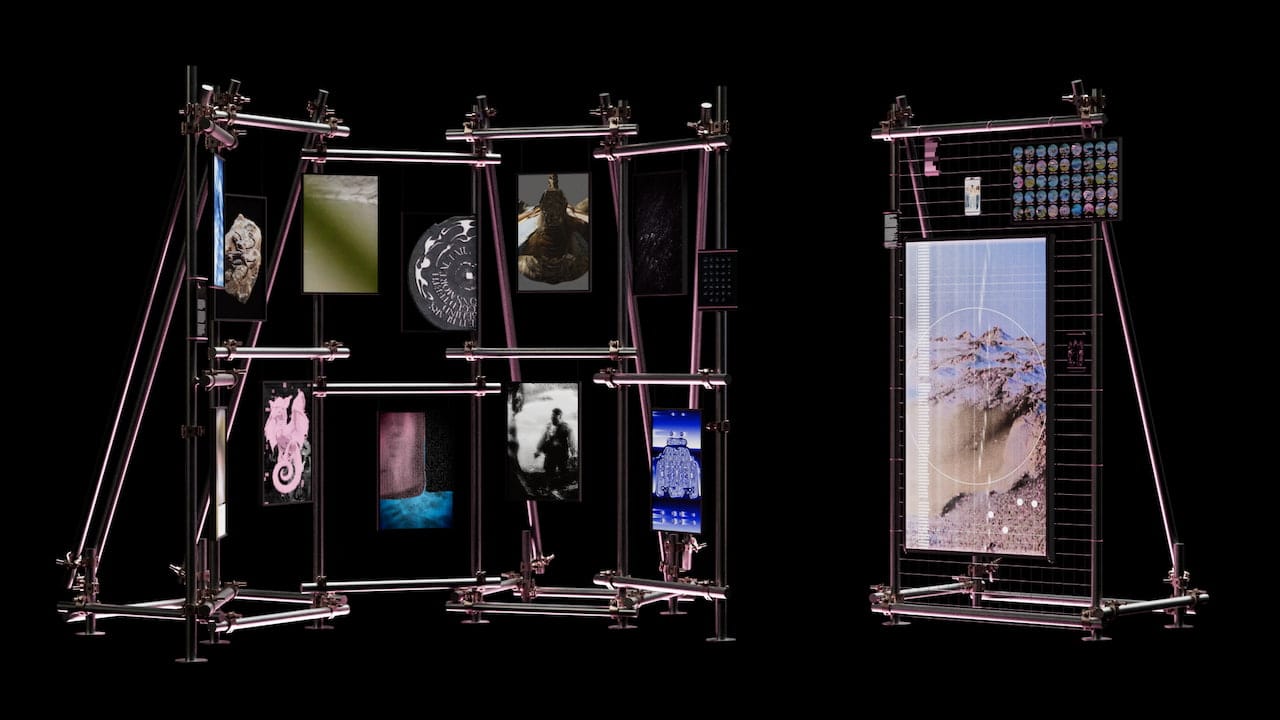
Here is where Daydream came in.
The project is called An Ecology of Beasts, and it was built by Common Index, a Milan-based collective working at the intersection of design, technology, and shared practice. We powered the generative layer of their interactive installation, Cartography of Entangled States, through hosted StreamDiffusion on the Daydream API.
Who Common Index is
Common Index is Carlotta Bacchini, Dorsa Rafiee, Pietro Forino, and Simone Restifo Pilato.
Their manifesto opens with a line we keep coming back to: "Common Index is a device for design inquiry, collective making, and digital experimentation. Not for impact, but for care."
If you spend any time with their work, that closing pair holds up.
The whole structure of An Ecology of Beasts is built around making space for other people's voices instead of resolving everything into a single curatorial statement. They typically run open calls instead of selections. They split projects into interconnected components instead of finished artworks. And what we really enjoyed - they usually write about their process in essays, not press releases. We gravitated toward them because that posture matches how we think about Daydream: infrastructure should let other people do their best work, not get in the way of it.
The two layers of An Ecology of Beasts
The project rethinks the medieval bestiary as a system rather than a catalog. In a real bestiary, the meaning of a creature came from how it sat next to the others. Behavior, environment, and relation were the unit, not the individual figure.
Common Index translated that into two interconnected components.
The first is the Collective Bestiary: an open call where 44 participants drew a creature from a custom-designed deck of 42 medieval beasts, from Amphisbaena to Zitius, then reinterpreted it however they wanted. The only constraint was that the output had to be a vertical video. Designers, filmmakers, developers, and researchers all submitted. The works coexist on the screens in the space, rotated by a non-linear narrative: the creatures respond to inputs captured via external sensors, which allows them to assert themselves based on their own characteristics, as well as a democratic rotation system. As a consequence, there is no curation flow or theme grouping, nor any hierarchy.
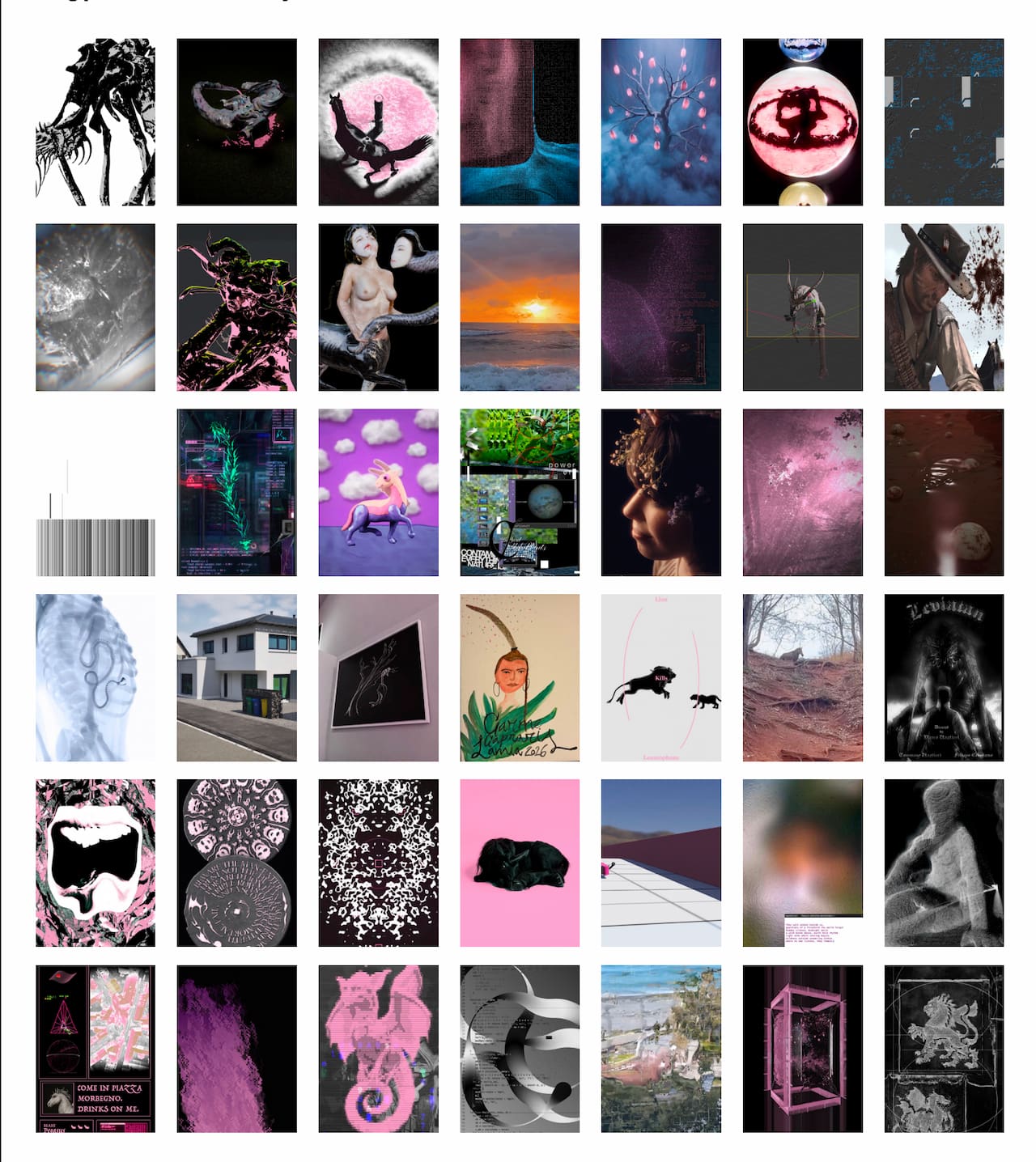
The second is Cartography of Entangled States, the environmental counterpart. Where the bestiary gives shape to individual imaginaries, this installation gives shape to the world the beasts inhabit. The reference is to medieval mappae mundi: maps in which geography, theology, and mythology share the same surface, and in which places appear next to each other based on relation rather than coordinate distance.
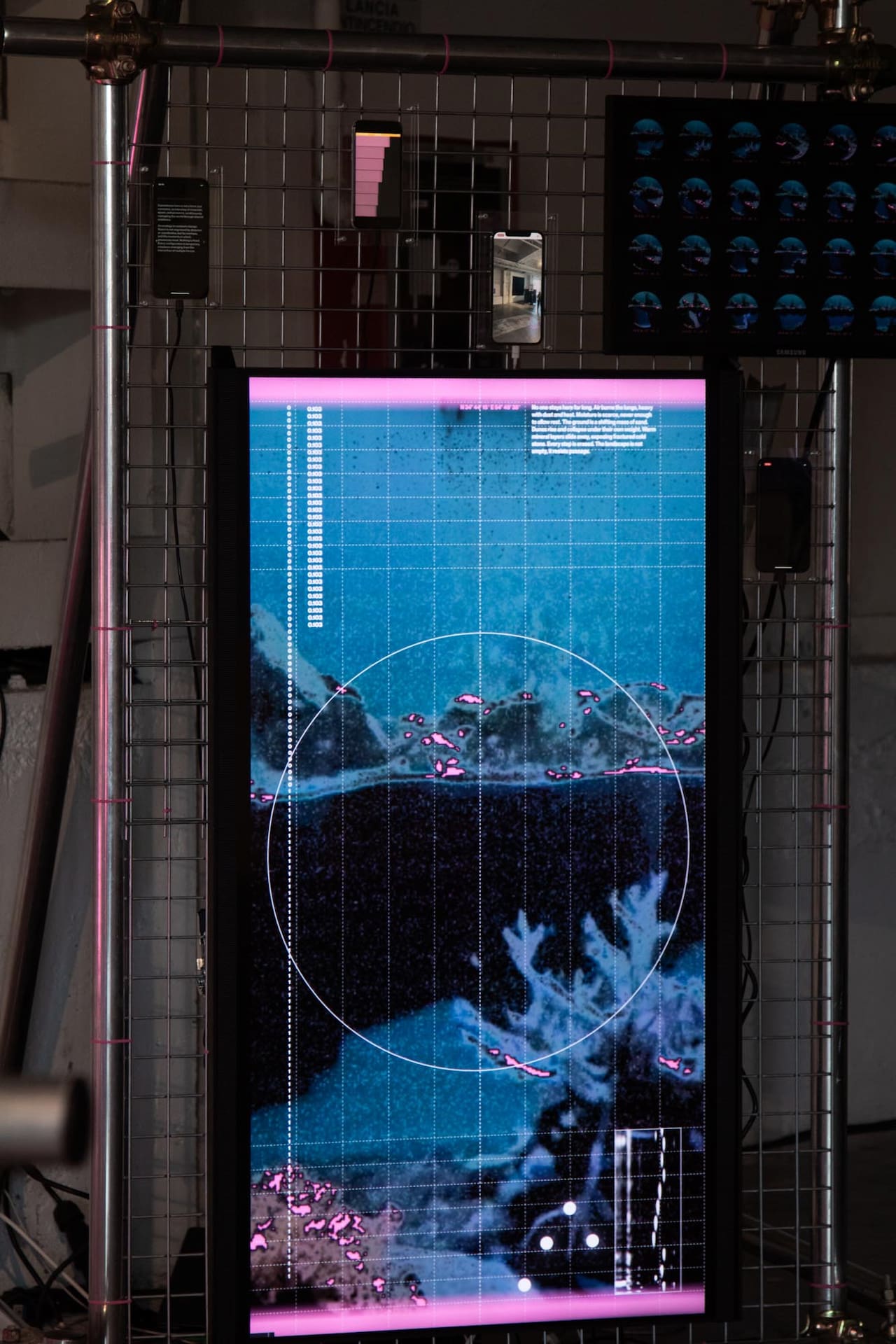
Fra Mauro's Mappa Mundi from around 1450, the Psalter World Map from around 1265, and the Hereford Mappa Mundi from around 1300. Common Index translated that approach into a real-time digital landscape: zones of erosion, darkness, origin, and accumulation, all coexisting and shifting.
This is the screen running on hosted StreamDiffusion.
What the installation actually does
The Cartography is a continuously generated landscape that never settles. Inputs feed it from two directions.
From inside the room, presence detection, movement detection, and the overall sound level are all read live.
From outside, weather APIs return temperature, humidity, and precipitation data, connecting the installation to atmospheric conditions beyond the exhibition itself. Common Index wrote that these signals act as "underlying forces, allowing the landscape to evolve as a composite response to presence, activity, and surrounding conditions." The landscape reacts, but visitors don't drive it deterministically. You can feel that you're inside the system without ever quite seeing your own gesture come back at you.
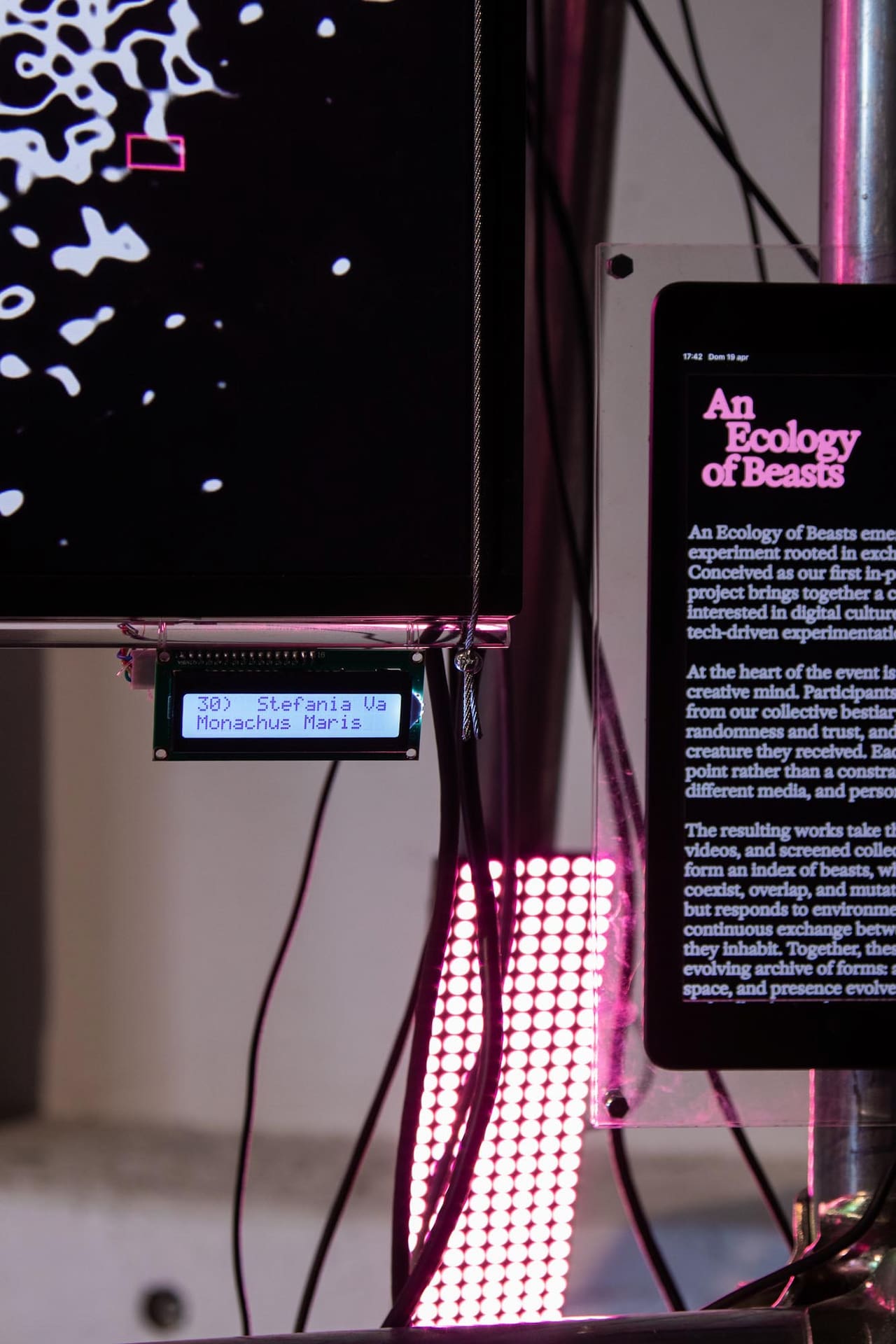
The system also accumulates. Temporary states are captured and recomposed over time, forming a visual memory of the room. The installation works as both a living ecosystem and an archive, a dual function it shares with a medieval bestiary. Their dossier shows grids of these snapshots: dozens of landscape configurations stamped with date and time, each one a momentary equilibrium that already no longer exists by the time you've read its timestamp.
Why the cloud route made sense for this work
If you've built anything in TouchDesigner that uses diffusion-based generation, you know the local-render rig is real engineering. You're committing a high-end GPU to the venue for the duration of the show. You're managing thermals and uptime for however many days the exhibition runs. Any creative iteration during install means you're doing it on the same hardware that's about to run the installation continuously. For An Ecology of Beasts, that show was seven days at Milan Design Week.
So Common Index didn't go that route. They sent their inputs from TouchDesigner to our API, we ran the diffusion model on our infrastructure, and the frames came back to TouchDesigner where their project composited them with the grid, coordinates, and overlay graphics you can see in the photos.
A few things this changes in practice. The render machine isn't on site, so the venue setup consists only of displays and sensors. Iteration during testing doesn't compete with production capacity, because there isn't a single fixed GPU to compete over. Stability during a week-long continuous run becomes our problem, not theirs. And on the creative side, the hardware ceiling that usually shapes what you can attempt with diffusion in a live context just lifts.
Common Index put it more directly than we would, in their LinkedIn post about the show:
Their open-source cloud infrastructure gave us the freedom to stay fully inside the concept. The flexibility of their tools allowed us to integrate them seamlessly with almost no effort from our side. From them, we received pretty infinite computation time for testing and exhibiting the installation, but above all, we received constant support at almost every time of the day.
That last line is the part we care about most. Generative systems for live exhibitions are the kind of project that might need attention at 11 pm the night before opening, and the partner you want is the one who picks up the call.
How hosted StreamDiffusion fits with TouchDesigner
If you've worked with StreamDiffusion locally, the cloud path is mostly the same shape, just with the model elsewhere.
Hosted StreamDiffusion is our managed version of the StreamDiffusion pipeline, running on the Daydream API. It went live a while ago and has been quietly powering work like Common Index's since.
The model itself runs in our cloud, so if you're on a Mac or an underpowered Windows machine, StreamDiffusion finally runs on your hardware. It works great with the StreamDiffusionTD plugin built by Lyell Hintz (dotsimulate), which stays exactly where it's always been, inside TouchDesigner.
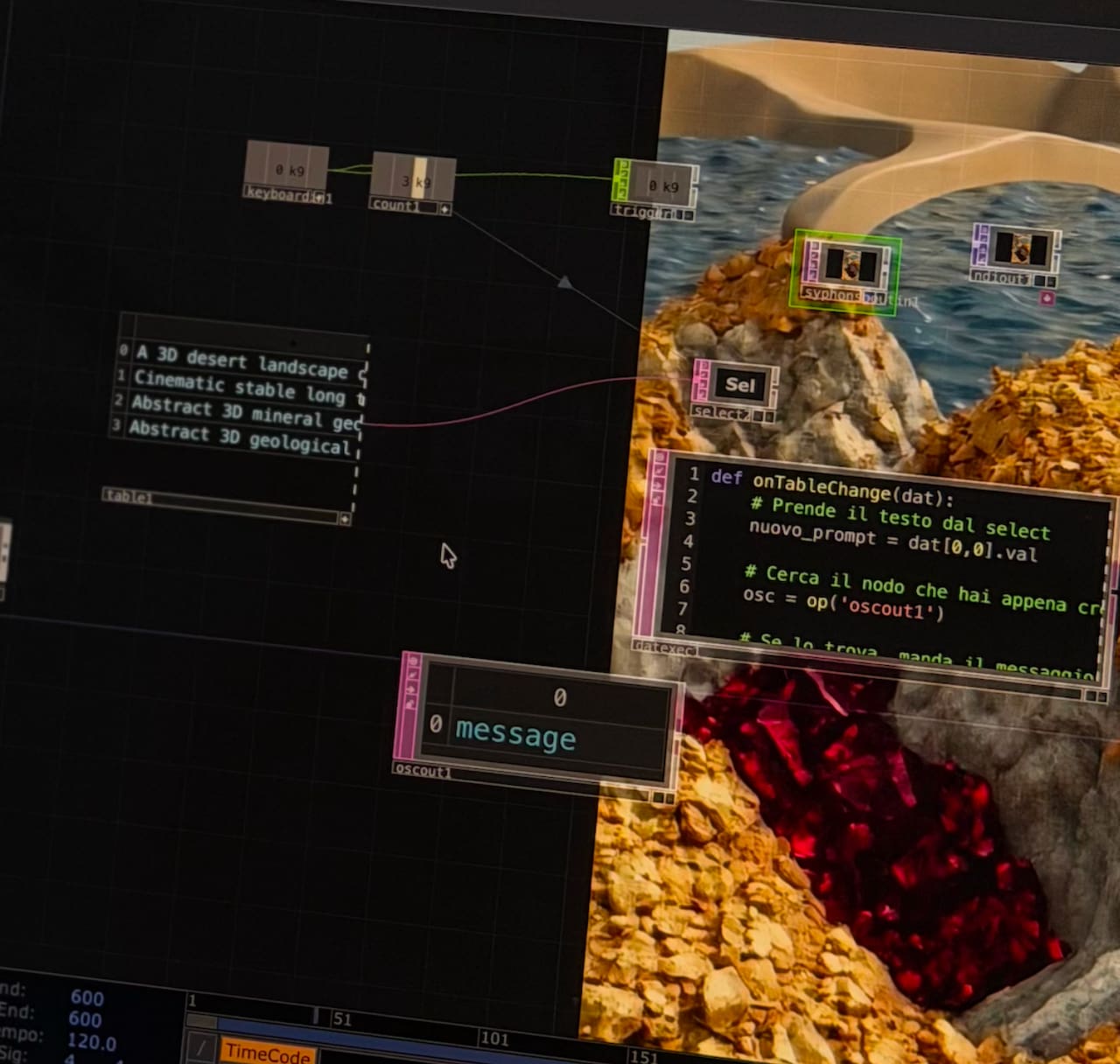
The mental model is straightforward. TouchDesigner stays in the place where you do your concept work, scene composition, sensor wiring, and output. The diffusion happens elsewhere.
You send parameters and source frames to the API, you get processed frames back, and the rest of your TD project doesn't have to know or care that there's a cloud GPU in the loop.
For Common Index, this meant their sensor-to-landscape logic stayed inside the TouchDesigner project where it belonged, and the model layer was just one more node away.
What this points at
Common Index is going to keep building. They are interested in exploring and using AI tools in unconventional ways. What does that mean? Essentially, they are exploring integration of AI in different parts of the process - going beyond only generative AI for images, and getting closer to (and involving) real-time AI in the interaction process itself.
And as for Daydream, we're going to keep building too. Hosted StreamDiffusion is one of the pieces of the Daydream API, and projects like this one tell us a lot about what installation artists actually need from the model layer when they're not just demoing in a studio but committing to a public, continuous run.
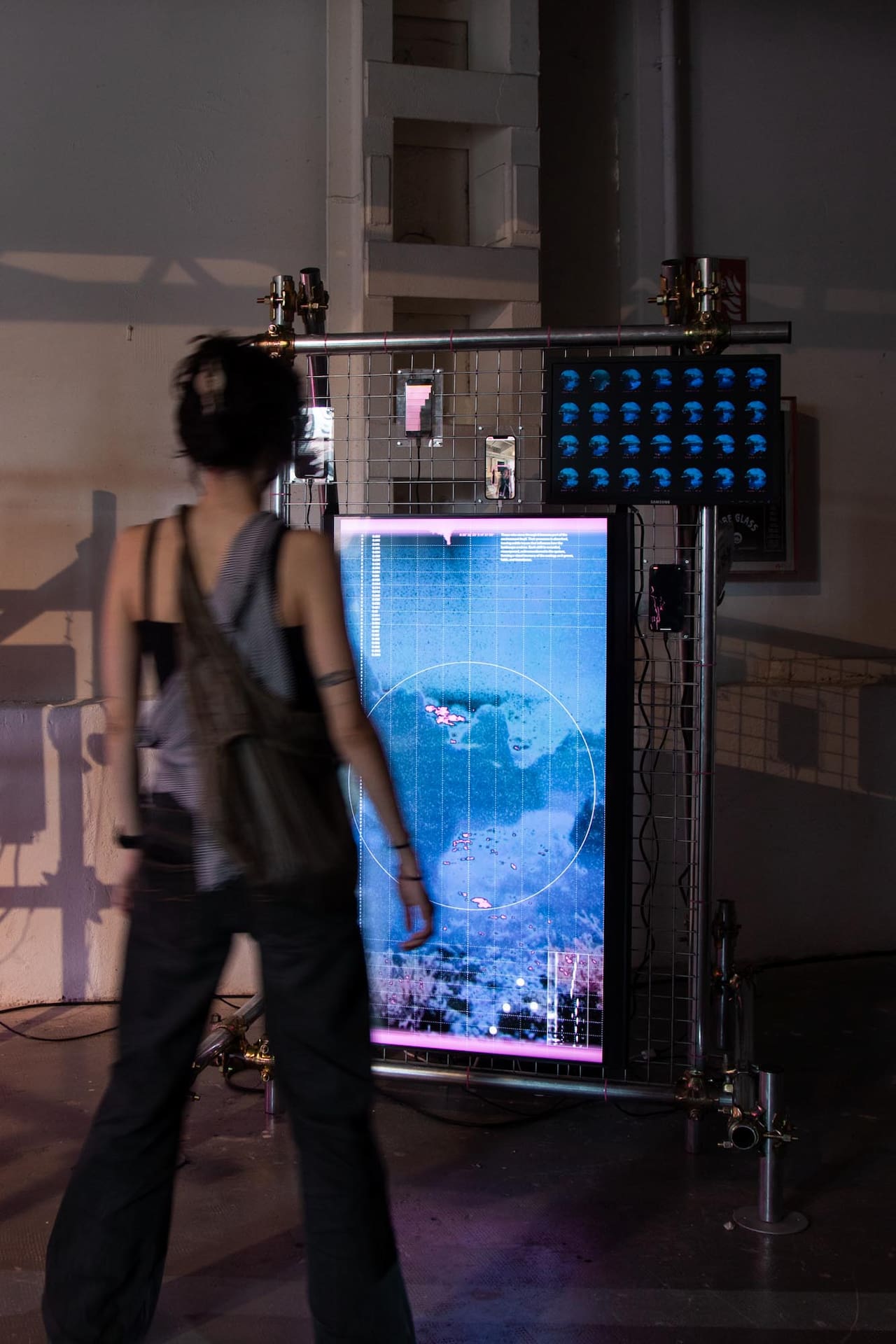
If you're working on something similar, the integration path is well-trodden: TouchDesigner, the StreamDiffusionTD plugin from dotsimulate, and the Daydream API. You can read more about what hosted StreamDiffusion does and why it exists in the foundational post on the Daydream blog. If you want to talk through a specific install, you can grab the API directly at daydream.live/streamdiffusiontd or drop us a line in our Discord. We tend to be around.
The bestiary was on the small screens. The cartography was on the bigger one. Somewhere in there, a model was running on our infrastructure, generating a landscape that nobody who walked through that room will ever see again.
An Ecology of Beasts is a project by Common Index: Carlotta Bacchini, Dorsa Rafiee, Pietro Forino, and Simone Restifo Pilato. Exhibition design by Sole° (Asia Trianda, Nicolò Cozza), with engineering support from R4M Engineering.
The workshop "Sensing Beyond the Human" was led by Giacomo Baccega. Presented at BASE Milano, April 20-26, 2026, as part of We Will Design 2026, HELLO DARKNESS.
Generative and computational support: Daydream.
`, datePosted: `May 7, 2026`, img: `https://storage.ghost.io/c/ee/84/ee847f83-2527-4049-945e-511415a6b18b/content/images/2026/05/daydream-hosted-streamdiffusion-common-index-case-study.jpg`, excerpt: `You walk into the industrial spaces at BASE Milano during this year's Milan Design Week. Metallic structures rise from the ground. On one side, vertical screens hang from a frame, cabled together, headphones dangling between them. On them, vertical videos play in rotation: beasts pulled from a medieval bestiary and reinterpreted by 44 different artists. On the other side, a standalone structure hosts a landscape always moving. Mountains push up, water finds new edges, and vegetation thicken`, readingTime: 8 }, { title: `Why Scope's Workflow Builder is a node graph`, href: `https://blog.daydream.live/why-scopes-workflow-builder-is-a-node-graph/`, author: `By Daydream Team`, content: `There's a recurring pattern in how people hit the ceiling in Scope. Someone has a generation model running, but running the model is only the first layer of what they actually want to build. Frame interpolation stacks on top so the frame rate lands in the live-performance range. A community-built visual-effects node layers over the interpolated output. A slider gets wired through a MIDI controller so effect intensity can move under a performer's thumb during a set. The whole graph feeds a sink for output and a recorder for capture, and any node in the stack needs to be swappable without tearing down the rest.
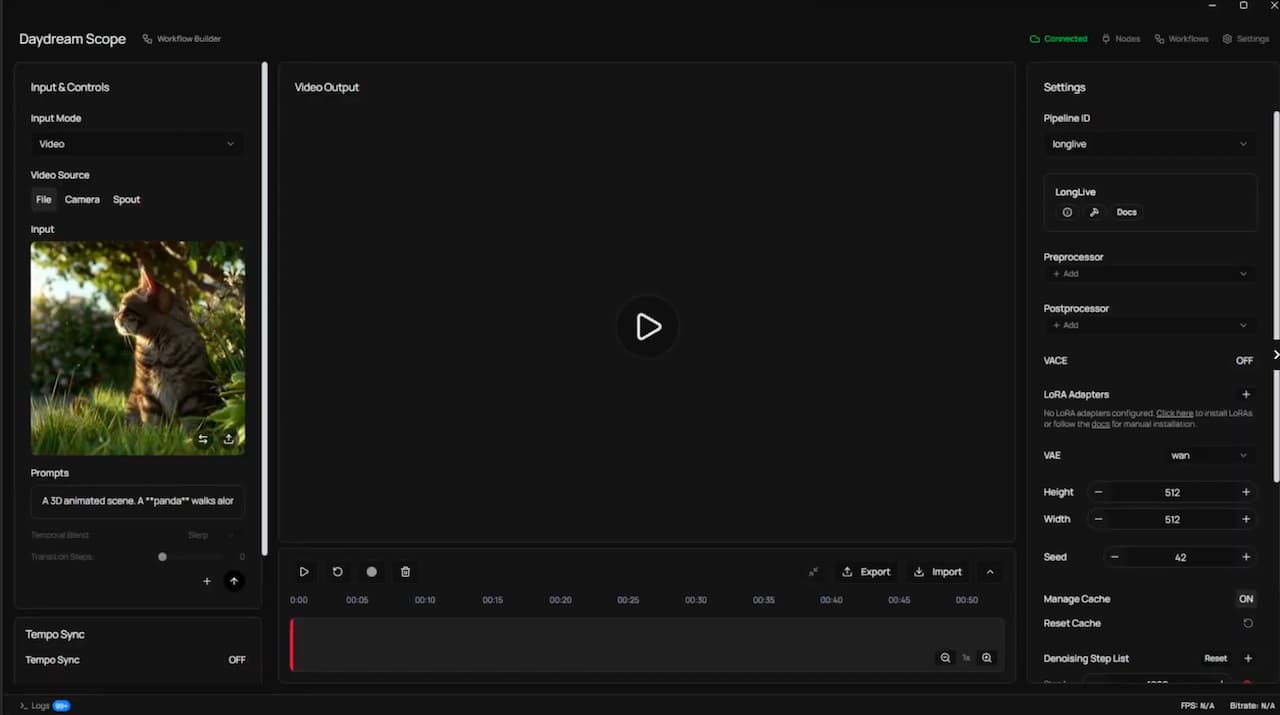
In Scope's original interface (what we now call Perform mode), most of this was possible. It just wasn't easy. Combining capabilities meant moving between panels, reasoning about which setting affected what, and keeping the shape of the pipeline in your head the whole time. Users were describing what they wanted with their hands: this goes into that, and then that goes into this, and this one controls that. They were drawing a graph. The interface wasn't letting them.
That is the problem the Workflow Builder is solving, and it's a problem about composition rather than description. Users weren't struggling to explain their pipelines after the fact. They were struggling to build them in the first place because combining capabilities was harder than it needed to be.
Why node graphs, specifically
This isn't a novel realization. The creative-tooling ecosystem has been converging on node graphs for a long time across every domain that deals with composable dataflow: Houdini for procedural VFX, Nuke for compositing, TouchDesigner for real-time interactive media, Unreal's Blueprints for game logic, Max/MSP and Pure Data for audio, Blender's geometry and shader nodes, Substance Designer for materials, and ComfyUI for diffusion-model image generation. In every one of those domains, the node graph replaced or grew alongside more panel-driven alternatives, and in every one of those domains it won on the same argument: the graph IS the program.
That is worth slowing down on.
In a conventional UI you have two layers. There is what the system is actually doing, which is a graph of processing stages with data flowing between them. And there is how the UI asks you to reason about it, which is a stack of panels, toggles, sliders, and menu items that you have to mentally compile into the underlying graph. Every change requires translation: I want the model output to feed into the interpolator, which means I need to find the right panel, enable the right toggle, and trust that the plumbing is happening somewhere I can't see.
A node graph collapses those two layers. The thing you draw is the thing the system runs. Your mental model and the system's representation are the same object, which means the cognitive overhead of "how do I tell the tool what I want" goes away. You want the interpolator to sit between the model and the output, you drag an edge from one to the other. There is no step in between.
This is the argument people make when they explain why they moved to ComfyUI from Automatic1111 for anything serious. ComfyUI is often less approachable than Automatic1111 at first glance. The wins show up in what it lets you compose: every operation (text encoding, sampling, VAE decoding, conditioning) is a node, dependencies are explicit, and composition becomes mechanical rather than interpretive. You swap a sampler without rebuilding the session. You stack a second LoRA without figuring out where in the panel it lives. You export the workflow as JSON and someone else runs the same thing exactly.
Real-time AI video has the same underlying shape. It's dataflow. Frames move from a source, through a generation model, through post-processing, into a sync or a record node. Control signals move from sliders, MIDI hardware, audio analyzers, and scheduler triggers into the parameters of the nodes they modulate. It is a graph under the hood regardless of what the UI looks like. The question was whether Scope's interface was going to reflect that or keep hiding it.
What the Workflow Builder actually is
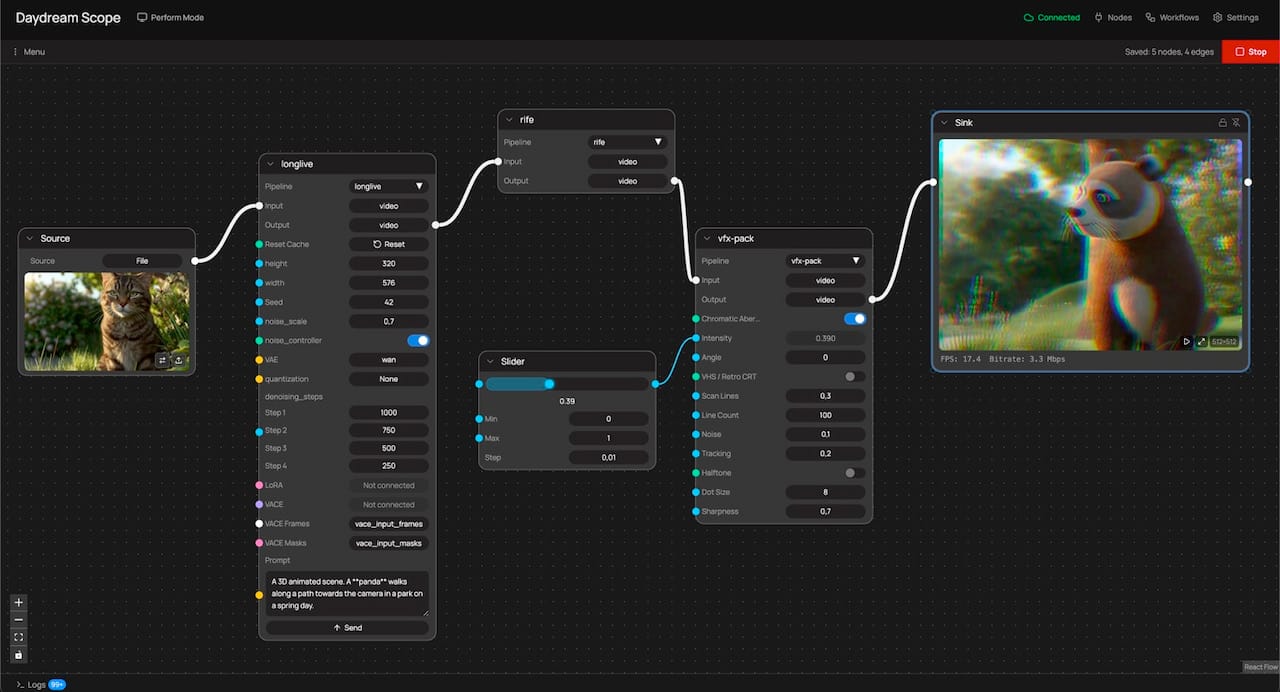
The Workflow Builder shipped as Scope's default mode in v0.2.0 (late March 2026). It's a canvas with more than twenty node types spanning sources, pipelines, sinks, LoRAs, subgraphs, scheduler, tempo, MIDI, prompt list, prompt blend, math, control sliders, image, record, and output. Color-coded handles encode type compatibility at a glance: cyan for numeric values, amber for text, orange for triggers, green for booleans. What you build in the canvas is the pipeline. There is no separate configuration the canvas is describing. Hit Play and the graph executes. Change a connection and the change is live.
The processing itself is the same processing that Scope has always offered. Several built-in pipelines, multiple nodes such as rife for frame interpolation, and community-built nodes published to the node registry. The Workflow Builder is adding capability, but equally important, it is making composition easy across capabilities that were already present.
A concrete example gives a sense of it. Start with a file or camera source. Wire it into LongLive for the generation stage. Stack rife downstream and you'll often move from around 13 FPS to the low 20s, which matters a lot for live work. Add a community-built VFX pack and pick one of its effects, chromatic aberration for example. Drop a slider node in, wire its output to the effect's intensity, and the slider becomes the live control surface for that parameter. Connect the final output to a sync so you can see it running, and add a record node so the output lands on disk. Six nodes, one screen.
Then change it. Swap LongLive for StreamDiffusionV2 without touching anything downstream. Add a Scheduler node that fires prompt changes at specific time points. Wire a MIDI CC handle into a Math node and then into a model parameter so a knob on your physical controller modulates a variable during a performance. Collapse your generation-plus-interpolation chain into a subgraph and reuse it across different output setups. That composition work was hard in the panel UI and is straightforward in the graph.
What it unlocks for the broader picture
The composition argument matters beyond any individual pipeline. When the interface is a graph, the community artifact becomes the graph itself. A workflow built by one person exports as a .scope-workflow.json file, lands on daydream.live, and someone else runs the exact same composition. Tuned patterns get packaged, shared, and remixed. Hardware integrations (OSC, MIDI, DMX, Syphon, Spout, NDI) become nodes alongside everything else, rather than separate configuration surfaces (still some work to be done around that). Live performance becomes the native use case because the graph you perform with is the same graph you built with.
This is the conclusion we kept arriving at in cohort sessions, workshops, and individual conversations over the past several months. People were stuck because the act of composition was harder than it needed to be, and once they had something working they couldn't easily extend it, share it, or reconfigure it without starting from scratch. The Workflow Builder is the interface that answers that.
There's more coming. LoRA workflows are getting richer, multi-model routing is here, and even multi-input setups are being designed. The graph is where all of that will live.
If you haven't switched over from performance mode, the full guide is in the docs.
Episode 6 of Building with Scope in Public walks through a complete pipeline build from scratch if you want to see it in motion: https://youtu.be/JXERXkMRkV8.
If you've built something worth showing someone else, export it and post it to daydream.live. The composition is the artifact now.
`, datePosted: `Apr 18, 2026`, img: `https://storage.ghost.io/c/ee/84/ee847f83-2527-4049-945e-511415a6b18b/content/images/2026/04/scope-daydream-workflow-builders.jpg`, excerpt: `There's a recurring pattern in how people hit the ceiling in Scope. Someone has a generation model running, but running the model is only the first layer of what they actually want to build. Frame interpolation stacks on top so the frame rate lands in the live-performance range. A community-built visual-effects node layers over the interpolated output. A slider gets wired through a MIDI controller so effect intensity can move under a performer's thumb during a set. The whole graph feed`, readingTime: 6 }, { title: `What is hosted StreamDiffusion, and why TouchDesigner creators should care`, href: `https://blog.daydream.live/what-is-hosted-streamdiffusion-and-why-touchdesigner-creators-should-care/`, author: `By Daydream Team`, content: `Hosted StreamDiffusion is Daydream's managed version of the open-source StreamDiffusion real-time diffusion pipeline, wired directly into TouchDesigner through the Daydream API.
The short version: you run the StreamDiffusionTD plugin exactly the way you always have, but the actual generation work happens on our GPUs instead of yours. You need no local NVIDIA card, Python environment, CUDA install, and there's no Windows-only lockdown.
As of April 2026, it's the path most TouchDesigner creators on macOS are using to work with StreamDiffusion at all, and the one our team at Daydream has been pushing hardest since the API went live in August 2025.
StreamDiffusionTD, the operator that made StreamDiffusion usable in a TouchDesigner network in the first place, has been the fastest way to get real-time AI video running inside TouchDesigner since late 2023.
The catch was always the same one: you needed a serious Windows machine with an NVIDIA GPU to run it at performance quality, which ruled out every TouchDesigner user on a Mac and a good chunk of creators who just didn't want to carry an RTX 4090 or 5090 to every gig.
Hosted StreamDiffusion fixes that. The same StreamDiffusionTD plugin now runs against the Daydream API's remote GPU, so you get real-time video generation inside TouchDesigner without any of the local hardware or Python setup. If you've been watching StreamDiffusion tutorials from the sidelines because your laptop wouldn't run them, that's over now.
Want to skip the context and just try it? The hosted StreamDiffusion page on daydream.live has the quickstart file, a free API key flow, and more relevant details. The rest of this post is for when you want to understand what actually changed and why it matters for TouchDesigner creators specifically.
A quick history of StreamDiffusionTD
Credit where it's due. Lyell Hintz, known in the TouchDesigner community as dotsimulate, built StreamDiffusionTD a few hours after the original StreamDiffusion research pipeline hit GitHub in late December 2023. His first public demo was an audio-reactive setup posted to X, and the tool has been shipping through his Patreon ever since. It's now on version 0.3.1 with SDXL-Turbo, multi-ControlNet, IP Adapter with FaceID, and a long list of other creative workflows that the community has helped shape through fixes and feature requests.
The reason it caught on is that Lyell approached the project like someone who actually uses TouchDesigner to make things. In a conversation with the Daydream team he put it simply:
"TouchDesigner is the only place this could be controlled from. It can hook into everything else."
The operator exposes the parameters that matter for live work (prompt, seed, ControlNet weights) instead of hiding them behind a black box, so you can drive generation from audio, sensors, cameras, MIDI, OSC, or whatever else you already have wired up.
Running it locally has never been easy
The tradeoff Lyell couldn't fix from inside TouchDesigner was the hardware requirement. The local version of StreamDiffusionTD needs Windows 10 or 11, an NVIDIA GPU with CUDA support, at least 6 GB of VRAM (24 GB recommended for the full feature set), Python 3.10 or 3.11, and a matching CUDA toolchain.
Apple Silicon Macs are out entirely because the upstream StreamDiffusion pipeline has no MPS path, so Mac TouchDesigner users have been watching the tutorials and reading the forum threads without being able to run the thing on their own hardware.
Even when you do have the right machine, the performance curve is steep. The Interactive & Immersive HQ benchmarked StreamDiffusionTD at 55 to 60 frames per second on an RTX 4090, dropping to around 16 fps on a 3060 12 GB, and falling to roughly 4 fps above 1024×1024 (closer to a slideshow than live animation). A community pricing anchor on Derivative put the real number on what it actually takes to do pro work with the local setup:
"\$3,000+ RTX 4090/5090 GPU workstation."
For a touring VJ or an installation artist quoting a commission, that's a line item you can't always justify, and it's one you definitely can't drag into the green room at a festival.
What hosted StreamDiffusion actually changes
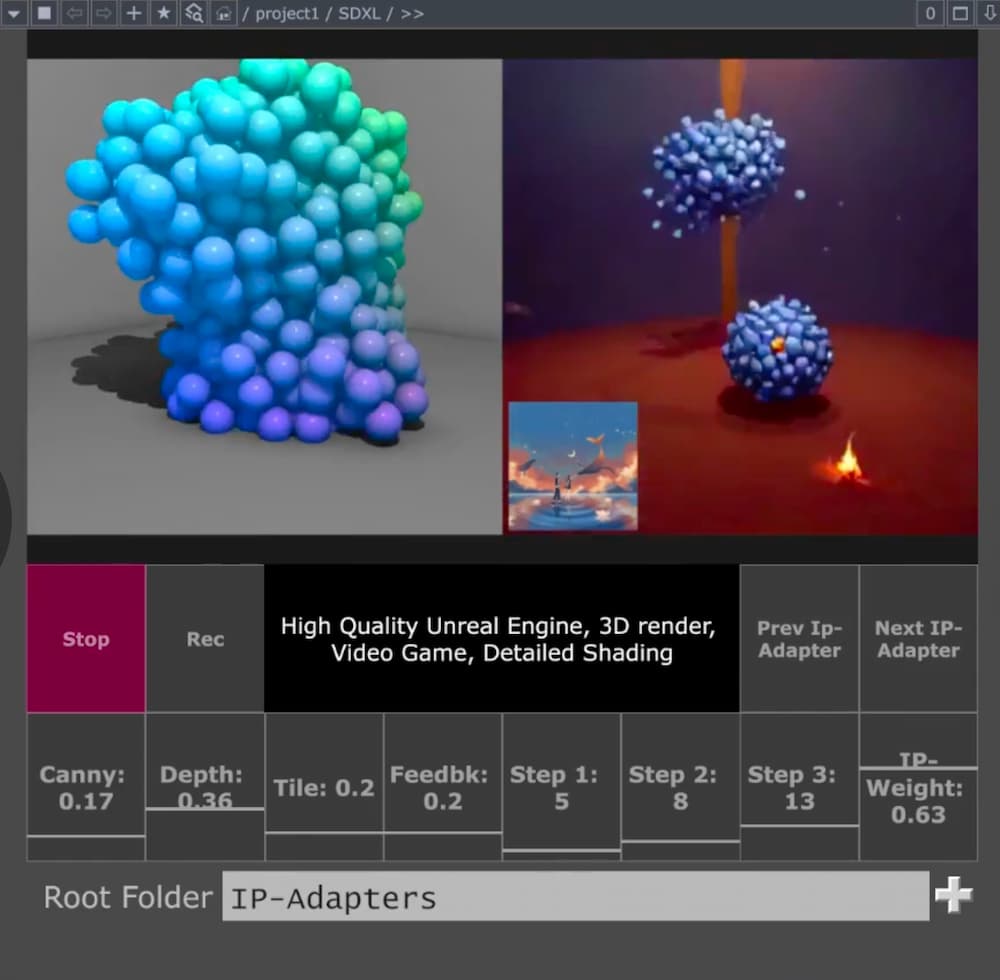
Hosted StreamDiffusion moves all of that inference to the Daydream API. The plugin stays where it's always been, inside TouchDesigner, on your canvas. The actual diffusion work just happens on Daydream's GPUs instead of yours. You drop your API key into the operator, hit Start Stream, and you're generating. The whole setup, as Lyell put it in that same conversation, takes less than a minute.
The list of things you stop needing is the interesting part. You don't need Windows. You don't need an NVIDIA GPU. You don't need a Python environment or a matching CUDA toolchain. You don't need to download model weights, and you don't need to keep them up to date. What you do need is a free API key from the Daydream Builder Dashboard and a machine that can run TouchDesigner and reach the internet. On top of that, the hosted path enables features that are hard or expensive to run locally (multi-ControlNet, IP Adapter with FaceID, TensorRT acceleration), and every parameter stays adjustable in real time while your stream is live.
The biggest shift is cultural more than it is technical. For the first time, the Mac TouchDesigner community isn't shut out of StreamDiffusion work. If you've been building generative systems on an M-series MacBook Pro, you can pipe them through hosted diffusion and back into your network the same way a Windows creator with a 4090 or 5090 in the tower would, without changing operating systems or buying new hardware.
We've felt that shift directly on our end: the questions we used to get started with "what GPU do I need to buy," and the shift to "what should I prompt."
What this looks like in practice
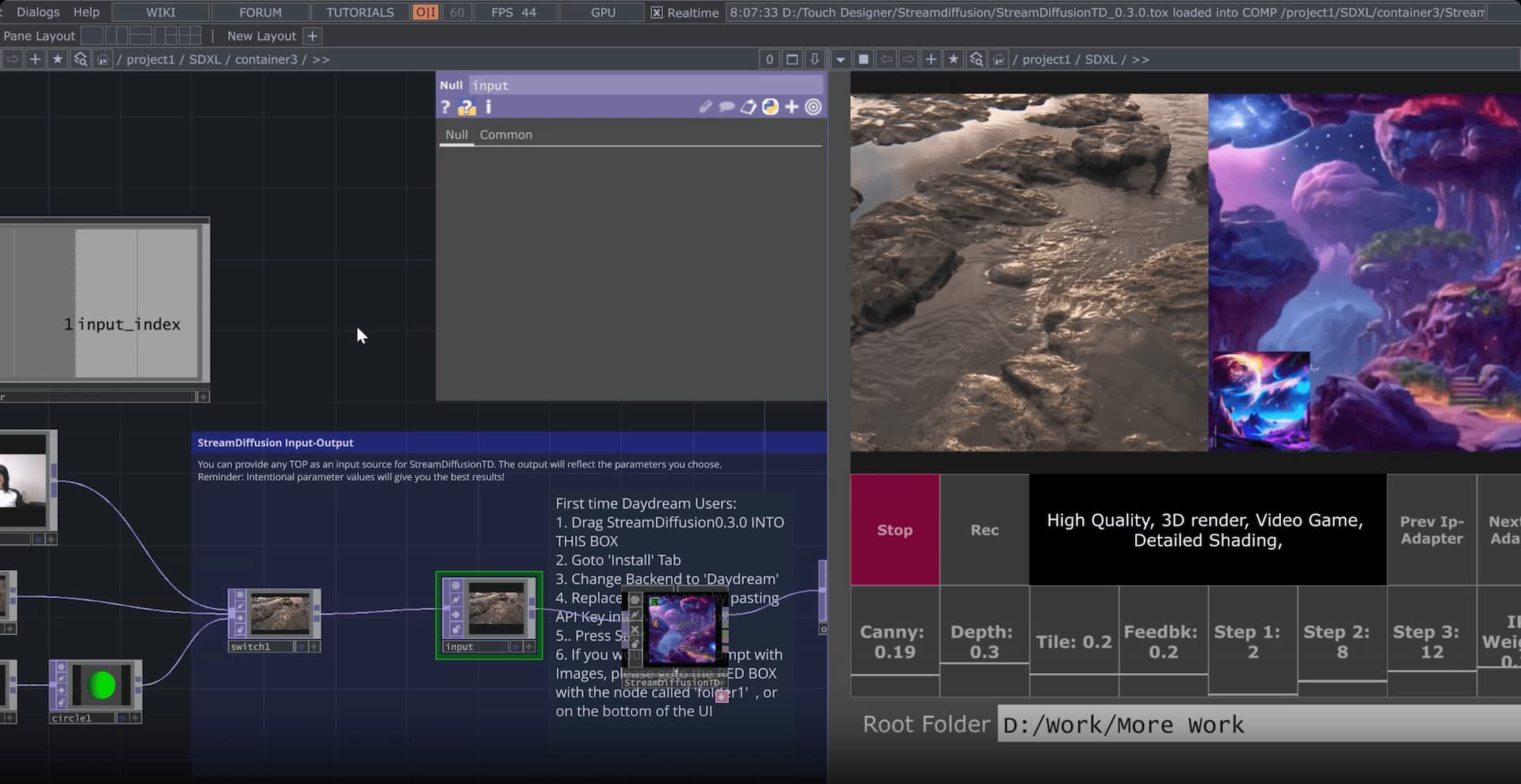
If you're a VJ cutting live visuals, you can drive the StreamDiffusion pipeline from whatever audio-reactive logic you already have in TouchDesigner (CHOPs, particle systems, camera feeds, MIDI from the DJ booth) and have the AI output appear at frame rates that actually sit inside a live set. No pre-rendering, no offline passes, just real-time generation sitting next to your other sources in the mix.
If you're an installation artist, the interesting bit is that the inference is no longer tied to a machine on site. A small Mac running TouchDesigner and calling the Daydream API is a very different shipping and power footprint than a workstation with a 4090 or 5090 in it, and a lot easier to keep stable across a multi-week exhibit.
If you're doing projection mapping or LED work, the hosted path frees up your local GPU for the things TouchDesigner is already good at (shaders, warping, geometry) while the diffusion happens somewhere else. You stop having to choose between "the mapping runs smoothly" and "the AI runs smoothly."
If you're on macOS, this is the first time StreamDiffusionTD has been available to you at all, and the setup isn't a workaround. It runs the same way it would on any other machine that can call the Daydream API, with the same features and the same control surface.
Where to start
The fastest way in, and the one we've been recommending to pretty much every TouchDesigner creator who asks, is Daydream SDXL Easy Quickstart File. It's a ready-to-use .tox that wires StreamDiffusionTD to your Daydream API key with a click-and-drag install, and it gives you real-time prompt editing, multiple ControlNets, IP-Adapter image prompting from folders, and input switching for webcam, video files, and TouchDesigner network sources out of the box. It needs TouchDesigner 2023 or newer on Mac, and 2025 or newer on Windows for the SDXL Turbo path.
If you want the full story, the hosted StreamDiffusion landing page on daydream.live walks through the integration, the model features, and the FAQ.
Lyell's own StreamDiffusionTD documentation is where to go for plugin details and release notes. The Daydream builder story on dotsimulate is worth reading for the origin narrative in his own voice, and if you want a primer on what StreamDiffusion actually does under the hood, our earlier guide to StreamDiffusion and TouchDesigner covers the technical layer.
Where this fits
Hosted StreamDiffusion for TouchDesigner is one of a handful of paths Daydream already offers creatives who want real-time AI video to live inside the tools they already work in.
The other main one is Scope, our local-first desktop app for building real-time video and world-model workflows. Scope is free and open source, with the full source on GitHub.
Where Scope earns its place is in how it talks to the rest of your rig. It ships with a node-based editor and native integrations for Spout and Syphon, NDI, OSC, MIDI, and DMX. Those are the same protocols that already run your show control, your lighting rig, and your audio network, which means Scope can sit inside a live production pipeline without a bunch of glue code.
Scope is what you reach for when you want a purpose-built environment that runs your show control alongside the generation. StreamDiffusionTD on the Daydream API is what you reach for when you want StreamDiffusion sitting inside the TouchDesigner network you've already wired up. Both share the same underlying idea: put real-time video generation in TouchDesigner, in Scope, or wherever else you work, within reach of working creatives without forcing them to change their toolchain or pour the cost of a touring rig into an RTX 4090 or 5090 workstation.
Between them, the audience for real-time diffusion in live visual work stops being "people with a top-end NVIDIA GPU" and starts being anyone with a laptop and a project to ship.
Common questions
Do I still need the StreamDiffusionTD plugin to use hosted StreamDiffusion?
Yes. The plugin is still the interface inside TouchDesigner. Hosted StreamDiffusion moves the diffusion inference to the Daydream API, but you still install dotsimulate's StreamDiffusionTD operator to drive prompts, parameters, inputs, and outputs from your network. The plugin and the hosted backend are complementary, not alternatives.
Does hosted StreamDiffusion work on a Mac?
Yes, and this is the main new capability. Any Mac that can run TouchDesigner will run StreamDiffusionTD against the Daydream API. Local StreamDiffusion has never been possible on macOS because the upstream pipeline has no Apple Metal path. Hosted changes that entirely, since the inference runs on our GPUs in the cloud rather than your machine. If you're on Apple Silicon, this is the first time you've had a real way to run StreamDiffusion in TouchDesigner.
What TouchDesigner version do I need?
Andrew Sun's Daydream SDXL Easy Quickstart File works with TouchDesigner 2023 or newer on Mac and 2025 or newer on Windows. If you're running your own StreamDiffusionTD install without the quickstart file, check dotsimulate's documentation for the version matrix and release notes.
How is hosted StreamDiffusion different from Daydream Scope?
Scope is an open-source desktop app with a node-based editor and native integrations for Spout, Syphon, NDI, OSC, MIDI, and DMX, built for creators who want a dedicated real-time AI video environment that talks directly to their show control. Hosted StreamDiffusion in TouchDesigner is the TouchDesigner-native entry point into the same Daydream API infrastructure. You'd pick Scope if you want the purpose-built environment. You'd pick hosted StreamDiffusion if you already live inside TouchDesigner and want StreamDiffusion to sit there too.
If you're building something on either path, we'd love to see it. Tag @daydreamliveai and come hang out with the rest of the community in our Discord.
`, datePosted: `Apr 11, 2026`, img: `https://storage.ghost.io/c/ee/84/ee847f83-2527-4049-945e-511415a6b18b/content/images/2026/04/hosted-streamdiffusion-touchdesigner.jpg`, excerpt: `Hosted StreamDiffusion is Daydream's managed version of the open-source StreamDiffusion real-time diffusion pipeline, wired directly into TouchDesigner through the Daydream API. The short version: you run the StreamDiffusionTD plugin exactly the way you always have, but the actual generation work happens on our GPUs instead of yours. You need no local NVIDIA card, Python environment, CUDA install, and there's no Windows-only lockdown. As of April 2026, it's the path most TouchDesi`, readingTime: 9 }]; export const youtubeData = [{ title: 'Scope workshop', href: 'https://www.youtube.com/watch?v=ggA2N4tInD0', author: 'By Daydream AI', content: '...', publishedDate: 'Mar 20, 2026', duration: 'PT49M32S', thumbnailUrl: 'https://i.ytimg.com/vi/ggA2N4tInD0/hqdefault.jpg' }, { title: 'Encuentros de Tecnólogos Creativos de Madrid Daydream x MappingOn', href: 'https://www.youtube.com/watch?v=yZHcay_uodc', author: 'By Daydream AI', content: 'Visuales Generativos en Tiempo Real: TouchDesigner × StreamDiffusion × Daydream En este workshop de 2 horas exploramos cómo crear visuales generativos en tiempo real combinando TouchDesigner, StreamDiffusion y Daydream. Recorrimos el flujo completo desde la entrada hasta la salida, procesando con IA generativa en vivo, desde configuración básica hasta un Live VJ Show con videomapping. ¿Qué es Daydream? Daydream es una plataforma de video IA en tiempo real que genera y transforma contenido vis...', publishedDate: 'Mar 4, 2026', duration: 'PT2H56M16S', thumbnailUrl: 'https://i.ytimg.com/vi/yZHcay_uodc/hqdefault.jpg' }, { title: 'Scope Workshop: AI Video Program Cohort 2 Finalist Showcase', href: 'https://www.youtube.com/watch?v=PyCTVICiueY', author: 'By Daydream AI', content: '...', publishedDate: 'Feb 27, 2026', duration: 'PT1H18S', thumbnailUrl: 'https://i.ytimg.com/vi/PyCTVICiueY/hqdefault.jpg' }, { title: '2.0 Interactive AI Video Program - Demo Day', href: 'https://www.youtube.com/watch?v=Um1g1TB2d4A', author: 'By Daydream AI', content: '...', publishedDate: 'Feb 26, 2026', duration: 'PT34M43S', thumbnailUrl: 'https://i.ytimg.com/vi/Um1g1TB2d4A/hqdefault.jpg' }, { title: 'Daydream Scope Workshop', href: 'https://www.youtube.com/watch?v=b771i2SFzjQ', author: 'By Daydream AI', content: '...', publishedDate: 'Feb 13, 2026', duration: 'PT1H2M18S', thumbnailUrl: 'https://i.ytimg.com/vi/b771i2SFzjQ/hqdefault.jpg' }, { title: 'Vibe-code a Scope plugin with Claude Code', href: 'https://www.youtube.com/watch?v=pUqF010u-zQ', author: 'By Daydream AI', content: 'Learn how to build a complete real-time video effects plugin for Daydream Scope using AI-assisted development with Claude Code - no Python or PyTorch experience required. We walk you through two different approaches: - Context7 MCP - an \"explore and build\" method where Claude pulls live documentation and figures out the plugin architecture on its own - Plugin Skill - an \"answer questions and ship\" method using a purpose-built skill with the full plugin reference baked in By the end, you\'ll hav...', publishedDate: 'Feb 11, 2026', duration: 'PT21M57S', thumbnailUrl: 'https://i.ytimg.com/vi/pUqF010u-zQ/hqdefault.jpg' }, { title: 'Scope Features Walkthrough', href: 'https://www.youtube.com/watch?v=Ls2OGg8soNU', author: 'By Daydream AI', content: 'This is a Scope features and a quick start video showcased in our docs....', publishedDate: 'Feb 11, 2026', duration: 'PT10M54S', thumbnailUrl: 'https://i.ytimg.com/vi/Ls2OGg8soNU/hqdefault.jpg' }, { title: 'Building Plugins for Scope', href: 'https://www.youtube.com/watch?v=rZjRahfJHiY', author: 'By Daydream AI', content: 'This video shows you how to build a VFX plugin for Scope, step by step....', publishedDate: 'Feb 11, 2026', duration: 'PT13M50S', thumbnailUrl: 'https://i.ytimg.com/vi/rZjRahfJHiY/hqdefault.jpg' }, { title: 'Realtime Creator Lounge #2', href: 'https://www.youtube.com/watch?v=2P0MDY-G5Qo', author: 'By Daydream AI', content: '...', publishedDate: 'Jan 28, 2026', duration: 'PT1H6M50S', thumbnailUrl: 'https://i.ytimg.com/vi/2P0MDY-G5Qo/hqdefault.jpg' }, { title: 'How to connect TouchDesigner to Scope via NDI', href: 'https://www.youtube.com/watch?v=YmJSqcoWz-o', author: 'By Daydream AI', content: 'This video is to help TouchDesigner users to set up their first Scope project using TouchDesigner. After this video, any user will be able to use any TouchDesigner visual as an input for Scope via NDI. Project File: https://app.daydream.live/creators/as.ws__/touchdesigner-scope-tutorial-first-connection?utm_source=youtube&utm_medium=social&utm_campaign=scope-touchdesigner NDI Tools: https://ndi.video/tools/ Depth Map Visual: https://civitai.com/models/972736/3d-motion-depth-map-18-24-30-fps Lon...', publishedDate: 'Jan 28, 2026', duration: 'PT13M35S', thumbnailUrl: 'https://i.ytimg.com/vi/YmJSqcoWz-o/hqdefault.jpg' }, { title: 'TouchDesigner x Scope EP 03: Depth Maps and VACE', href: 'https://www.youtube.com/watch?v=v53458eIqeY', author: 'By Daydream AI', content: 'In this third episode of TouchDesigner × Scope, I use the Depth TOP in TouchDesigner to create a depth map to activate VACE to better control my output visual. Project files and assets can be found here: https://app.daydream.live/creators/as.ws__/touchdesigner-x-scope-ep-03-depth-maps-and-vace?utm_source=youtube&utm_medium=social&utm_campaign=scope-touchdesigner More episodes coming soon as we dive deeper into Scope\'s video models, prompting workflows, and real time creative control. 1:03 -...', publishedDate: 'Jan 28, 2026', duration: 'PT7M51S', thumbnailUrl: 'https://i.ytimg.com/vi/v53458eIqeY/hqdefault.jpg' }, { title: 'TouchDesigner × Scope EP 02: Krea Model and Denoising', href: 'https://www.youtube.com/watch?v=NVumbOMf-os', author: 'By Daydream AI', content: 'In this second episode of TouchDesigner × Scope, I use the same visual input as the previous video to understand model differences and make sense of denoising parameters. Project files and timeline assets can be found here: https://app.daydream.live/creators/as.ws__/touchdesigner-x-scope-first-connection?utm_source=youtube&utm_medium=social&utm_campaign=scope-touchdesigner More episodes coming soon as we dive deeper into Scope\'s video models, prompting workflows, and real time creative contro...', publishedDate: 'Jan 24, 2026', duration: 'PT6M46S', thumbnailUrl: 'https://i.ytimg.com/vi/NVumbOMf-os/hqdefault.jpg' }, { title: 'TouchDesigner × Scope EP 01: First Output', href: 'https://www.youtube.com/watch?v=K_tX255qSkw', author: 'By Daydream AI', content: 'In this first episode of TouchDesigner × Scope, I explore using TouchDesigner as a live input source for Scope running the LongLive Model. Project files and timeline assets can be found here: https://app.daydream.live/creators/as.ws__/touchdesigner-x-scope-first-connection?utm_source=youtube&utm_medium=social&utm_campaign=scope-touchdesigner More episodes coming soon as we dive deeper into Scope\'s video models, prompting workflows, and real time creative control. 0:00 - Introduction & Overv...', publishedDate: 'Jan 24, 2026', duration: 'PT8M29S', thumbnailUrl: 'https://i.ytimg.com/vi/K_tX255qSkw/hqdefault.jpg' }, { title: 'Building with Scope in Public #5: Scope Plugins + Overworld\'s World Model', href: 'https://www.youtube.com/watch?v=cW3ZGxZNX0g', author: 'By Daydream AI', content: 'Scope now supports plugins - and we\'re using it to explore AI-generated worlds you can actually walk around in. In this episode, I walk you through installing the scope-overworld plugin, which brings Overworld\'s Waypoint-1 world model into Scope. Unlike regular real-time video generation, world models let you navigate 3D environments using WASD and mouse controls. It\'s like stepping inside an AI-generated video game. We go from zero to walking on Mars, a cozy Christmas scene, and more - all ru...', publishedDate: 'Jan 23, 2026', duration: 'PT11M10S', thumbnailUrl: 'https://i.ytimg.com/vi/cW3ZGxZNX0g/hqdefault.jpg' }, { title: 'Scope Workshop - Plugins Preview', href: 'https://www.youtube.com/watch?v=BYFbb6erRfw', author: 'By Daydream AI', content: 'Scope Workshop - Plugins Preview Scope is getting a plugins feature - opening the door for extensibility and new capabilities beyond our core pipelines. We will: 1) Demo the OverWorld plugin, which brings a world model to Scope with interactive controls and real-time exploration. 2) Show you how it works, talk through the plugins architecture, and share how you can get started building your own. 3) Touch on controllability, what you can build around this, and where we\'re headed. If you\'ve ...', publishedDate: 'Jan 23, 2026', duration: 'PT1H7M19S', thumbnailUrl: 'https://i.ytimg.com/vi/BYFbb6erRfw/hqdefault.jpg' }, { title: 'Daydream Interactive AI Video Program Demo Day', href: 'https://www.youtube.com/watch?v=pC-S9ALjB38', author: 'By Daydream AI', content: 'Join us for the Interactive AI Video Program Demo Day, where we\'ll showcase projects built during Daydream\'s Interactive AI Video Program. Participants worked across two tracks: Daydream Scope Track and TouchDesigner / StreamDiffusionTD Track where they explored real-time, interactive AI video workflows. From these tracks, the top 3 projects will be selected and their creators will present their work live during Demo Day. The event features: Live demos from the top three projects across both...', publishedDate: 'Jan 17, 2026', duration: 'PT43M30S', thumbnailUrl: 'https://i.ytimg.com/vi/pC-S9ALjB38/hqdefault.jpg' }, { title: 'Scope Workshop ft. the Scope Track Winners', href: 'https://www.youtube.com/watch?v=NhQSLMC6hvk', author: 'By Daydream AI', content: 'This week\'s Scope Workshop ft. the Scope Track winners We\'re running a special Scope Workshop with the top three projects from the Scope Track of the Interactive AI Video Program. You\'ll get to see how these creators pushed Scope to build real-time, interactive AI experiences, and hear directly from them about their workflows, challenges, and breakthroughs. Featuring: 🥇 Lars Hurrelbrink: Scope V2V Integration for Unity A live system that streams game footage, depth, and character data into S...', publishedDate: 'Jan 16, 2026', duration: 'PT1H5M17S', thumbnailUrl: 'https://i.ytimg.com/vi/NhQSLMC6hvk/hqdefault.jpg' }, { title: 'Realtime Creator Longe', href: 'https://www.youtube.com/watch?v=i1D7nVCtjsU', author: 'By Daydream AI', content: 'Join us today in the Daydream Discord with the StreamDiffusionTD Track finalists from the AI Video Program. Demo 1: Juan Franco Phone-controlled generative L-systems built with TouchDesigner + StreamDiffusion. Link: https://app.daydream.live/s/sh/creators/juanelfranco/becoming Demo 2: Emil Petro Feedback-driven AI architecture where Brutalist structures evolve into living systems. Link: https://app.daydream.live/s/sh/creators/emilpetro/concrete Learn more about Daydream: X: @daydreamLiveAI ...', publishedDate: 'Jan 15, 2026', duration: 'PT1H12M22S', thumbnailUrl: 'https://i.ytimg.com/vi/i1D7nVCtjsU/hqdefault.jpg' }, { title: 'Daydream Interactive AI Video Program: Demo Day', href: 'https://www.youtube.com/watch?v=0mjO9gBXCKI', author: 'By Daydream AI', content: 'Join us for the Interactive AI Video Program Demo Day, where we\'ll showcase projects built during Daydream\'s Interactive AI Video Program. Participants worked across two tracks: Daydream Scope Track and TouchDesigner / StreamDiffusionTD Track where they explored real-time, interactive AI video workflows. From these tracks, the top 3 projects will be selected and their creators will present their work live during Demo Day. The event will feature: - Live demos from the top three projects acros...', publishedDate: 'Jan 14, 2026', duration: 'PT45M32S', thumbnailUrl: 'https://i.ytimg.com/vi/0mjO9gBXCKI/hqdefault.jpg' }, { title: 'Scope Workshop - Jan 7, 2026', href: 'https://www.youtube.com/watch?v=r_WrZAGco2o', author: 'By Daydream AI', content: 'Join us for this week\'s Scope workshop, where the Daydream team will showcase recent updates and expanded functionality we\'ve added to Scope. What we\'ll cover: - New Scope improvements and expanded capabilities, including VACE integration for things like reference image support and more, - Demos and insights from our team members, - What\'s ahead on our roadmap, As always, do come with your questions! We\'ll walk through what we\'ve built, show it in action, and discuss where Scope is heading nex...', publishedDate: 'Jan 10, 2026', duration: 'PT1H4M3S', thumbnailUrl: 'https://i.ytimg.com/vi/r_WrZAGco2o/hqdefault.jpg' }, { title: 'Learning with Scope in Public #4: Scope Desktop App and Community Hub', href: 'https://www.youtube.com/watch?v=M0vtuNSGphc', author: 'By Daydream AI', content: 'In this episode of Building in Public with Scope, I\'m sharing why Scope suddenly feels different - and it\'s not just one feature. Scope now has an early Windows desktop app, which means that if you have a powerful enough GPU (think RTX 4090 / 5090), you can run Scope locally, in real time, without touching the CLI or spinning up external infrastructure. This fundamentally changes the experimentation loop. In this video, I: - Walk through what changes when Scope runs as a desktop app - Use th...', publishedDate: 'Dec 20, 2025', duration: 'PT8M59S', thumbnailUrl: 'https://i.ytimg.com/vi/M0vtuNSGphc/hqdefault.jpg' }, { title: 'Scope Workshop: Building Interactive Games with Scope', href: 'https://www.youtube.com/watch?v=D-iUKOhPpPo', author: 'By Daydream AI', content: 'This Scope Workshop covers the latest updates to Scope, including new LoRA support, upcoming improvements, creative user scenarios, and how Scope integrates with tools like Unity and Unreal. We also introduce the Scope Hacker Program and answer questions from the community. In this session, guest speaker Cristian (https://www.ilumineworks.com/) demonstrates how he built a playable Choose Your Own Adventure style game using Scope and Unity. He walks through the full workflow, explains how large ...', publishedDate: 'Dec 19, 2025', duration: 'PT1H3M39S', thumbnailUrl: 'https://i.ytimg.com/vi/D-iUKOhPpPo/hqdefault.jpg' }, { title: 'MotionStream Workshop with Joonghuk', href: 'https://www.youtube.com/watch?v=03cZLjW_iiA', author: 'By Daydream AI', content: 'Joonghyuk Shin is one of the creators of MotionStream, the world\'s first real time video AI model controllable by motion, enabling real-time image to video that\'s highly controllable. In this workshop, Joonghyuk will walk us through the technical design behind this pipeline, demonstrate diverse practical downstream applications, and discuss future directions for interactive content creation. 🌟 About Daydream: Daydream is a community hub for real time video world models. You can explore cre...', publishedDate: 'Dec 8, 2025', duration: 'PT1H4M20S', thumbnailUrl: 'https://i.ytimg.com/vi/03cZLjW_iiA/hqdefault.jpg' }, { title: 'Learning with Scope in Public #3: Transform Any Video with LoRA Adapters', href: 'https://www.youtube.com/watch?v=qeHNE5BMQPE', author: 'By Daydream AI', content: 'What if you could turn a photorealistic video into a Pixar-style cartoon with one small file? In this episode, we explore LoRA adapters in Scope - small add-on files that teach the AI new visual styles without retraining or changing the entire model. I\'ll show you how to download a LoRA, where to find good ones, and the one thing you absolutely need to remember: the trigger keyword. Without it, your LoRA won\'t do anything. We\'ll run the same prompt twice - once photorealistic, once Pixar styl...', publishedDate: 'Dec 6, 2025', duration: 'PT7M37S', thumbnailUrl: 'https://i.ytimg.com/vi/qeHNE5BMQPE/hqdefault.jpg' }, { title: 'MotionStream Workshop w/ Joonghuk', href: 'https://www.youtube.com/watch?v=57JtK5QgGLU', author: 'By Daydream AI', content: '...', publishedDate: 'Dec 5, 2025', duration: 'PT1H11M27S', thumbnailUrl: 'https://i.ytimg.com/vi/57JtK5QgGLU/hqdefault.jpg' }, { title: 'Learning with Scope in Public #2: Can AI Upscalers Fix Low-Res Video?', href: 'https://www.youtube.com/watch?v=VRY8CP3AzyI', author: 'By Daydream AI', content: 'Low resolution = smooth real-time generation. But can you fix it in post-production? In this episode, we put AI upscalers to the test: Video2X (free & open source) vs Topaz Video AI (commercial). We generate a cozy Thanksgiving scene in Scope using Krea Realtime, then run it through both upscalers and compare the results side-by-side. 🚀 TRY SCOPE YOURSELF (free & open source): https://github.com/daydreamlive/scope Key Findings: - AI upscalers genuinely work - visible quality improvement - The...', publishedDate: 'Nov 29, 2025', duration: 'PT9M43S', thumbnailUrl: 'https://i.ytimg.com/vi/VRY8CP3AzyI/hqdefault.jpg' }, { title: 'Building with Scope in Public #1: What Kills FPS in Real-Time AI Video?', href: 'https://www.youtube.com/watch?v=ZRI6p1iLikM', author: 'By Daydream AI', content: 'What happens when you push real-time AI video generation to its limits? In this first episode, we test how resolution and denoising steps affect video quality and frame rate across three models: StreamDiffusion V2, LongLive, and Krea Realtime. Key Findings: - Doubling resolution = 85% FPS drop on LongLive - Fewer denoising steps = higher FPS but lower quality - Each model has different performance sweet spots Try Scope yourself and join our community: ⭐ GitHub: https://github.com/daydreamlive...', publishedDate: 'Nov 22, 2025', duration: 'PT16M4S', thumbnailUrl: 'https://i.ytimg.com/vi/ZRI6p1iLikM/hqdefault.jpg' }, { title: 'LoRAs + Real-Time Video Models: Scope v0.1.0a7 Walkthrough', href: 'https://www.youtube.com/watch?v=OygciNFzrVo', author: 'By Daydream AI', content: 'A walkthrough of using LoRAs in Scope v0.1.0a7. Release: https://github.com/daydreamlive/scope/releases/tag/v0.1.0a7 Additional resources: - Demo: https://x.com/YondonFu/status/1991948288736596415 - Install instructions: https://github.com/daydreamlive/scope?tab=readme-ov-file#install - First generation guide: https://github.com/daydreamlive/scope?tab=readme-ov-file#first-generation - LoRA guide: https://github.com/daydreamlive/scope/blob/main/docs/lora.md...', publishedDate: 'Nov 22, 2025', duration: 'PT5M4S', thumbnailUrl: 'https://i.ytimg.com/vi/OygciNFzrVo/hqdefault.jpg' }, { title: 'StreamDiffusion in TouchDesigner Workshop', href: 'https://www.youtube.com/watch?v=iLjksLHr2NI', author: 'By Daydream AI', content: 'Learn how to use Daydream\'s remote Stream Diffusion service to run advanced AI workflows without needing a \$3,000+ RTX 4090/5090 GPU workstation. Below you will find all relevant links: https://www.patreon.com/posts/streamdiffusiont-142969263 https://app.daydream.live/creators/daydream https://app.daydream.live/dashboard/api-keys Learn more about Daydream: X: @daydreamLiveAI Website: https://daydream.live/ Discord: https://discord.com/invite/daydreamlive...', publishedDate: 'Nov 13, 2025', duration: 'PT48M45S', thumbnailUrl: 'https://i.ytimg.com/vi/iLjksLHr2NI/hqdefault.jpg' }, { title: 'Workshop: SDXL IP ADAPTERS STREAMDIFFUSIONTD', href: 'https://www.youtube.com/watch?v=5Lbx3lm0yMY', author: 'By Daydream AI', content: 'Catch the walkthrough of Dotsimulate\'s & Andrew\'s latest update to StreamDiffusionTD, now featuring native SDXL support. The session will show how to get started with the new component, connect to local or hosted inference, and explore real-time image and video generation. For those without high-end GPUs, the update integrates Daydream\'s server-hosted SDXL service, making it easy to experiment and build directly from the cloud. We\'ll look at how to prompt with reference images, tune parameters...', publishedDate: 'Nov 8, 2025', duration: 'PT1H7M26S', thumbnailUrl: 'https://i.ytimg.com/vi/5Lbx3lm0yMY/hqdefault.jpg' }, { title: 'SDXL IP ADAPTERS STREAMDIFFUSIONTD Release', href: 'https://www.youtube.com/watch?v=ZLKunWNZymY', author: 'By Daydream AI', content: 'Join us for a walkthrough of Dotsimulate\'s latest update to StreamDiffusionTD, now featuring native SDXL support. The session will show how to get started with the new component, connect to local or hosted inference, and explore real-time image and video generation. For those without high-end GPUs, the update integrates Daydream\'s server-hosted SDXL service, making it easy to experiment and build directly from the cloud. We\'ll look at how to prompt with reference images, tune parameters for co...', publishedDate: 'Nov 7, 2025', duration: 'PT1H7M25S', thumbnailUrl: 'https://i.ytimg.com/vi/ZLKunWNZymY/hqdefault.jpg' }, { title: 'How to Run Daydream Scope in the Cloud with RunPod | Complete Setup Guide', href: 'https://www.youtube.com/watch?v=XBFtgSQg7X4', author: 'By Daydream AI', content: 'Learn how to get started with Daydream Scope using RunPod cloud - perfect if you don\'t have a powerful GPU locally. This step-by-step tutorial covers everything from initial setup to running your first real-time AI video generation pipeline. What you\'ll learn: Setting up Daydream Scope on RunPod.io Selecting the right GPU for your pipelines Configuring HuggingFace tokens for cloud environments Running Stream Diffusion and other pipelines Managing your cloud resources efficiently Important link...', publishedDate: 'Oct 31, 2025', duration: 'PT4M26S', thumbnailUrl: 'https://i.ytimg.com/vi/XBFtgSQg7X4/hqdefault.jpg' }, { title: 'Krea x Daydream Scope - Real-Time Video Model Integration', href: 'https://www.youtube.com/watch?v=uEvM638QWZI', author: 'By Daydream AI', content: 'The latest Daydream Scope release introduces support for the Krea AI real-time video model, enabling interactive text-to-video generation with smooth, dynamic prompt transitions. In this video, Yondon Fu walks through the new integration, showing how the model runs live inside Scope, including real-time prompt changes and performance benchmarks: ~6 FPS at 480×832 on NVIDIA H100 ~11 FPS at 320×576 on RTX 5090 with FP8 quantization (Linux only; Windows support in progress) Full release notes: ht...', publishedDate: 'Oct 31, 2025', duration: 'PT3M37S', thumbnailUrl: 'https://i.ytimg.com/vi/uEvM638QWZI/hqdefault.jpg' }, { title: 'Ian Messina - Realtime Video AI Summit 2025 by Daydream', href: 'https://www.youtube.com/watch?v=o9sBtdnFJ28', author: 'By Daydream AI', content: 'Ian Messina presented on \"Real Time Video AI in Virtual Production\" at the Real-Time Video AI Summit, hosted by Daydream, where leading researchers and creators explored the future of real-time video generation and creative AI. Learn more about Daydream: X: @daydreamLiveAI Website: https://daydream.live/ Discord: https://discord.com/invite/daydreamlive...', publishedDate: 'Oct 31, 2025', duration: 'PT16M59S', thumbnailUrl: 'https://i.ytimg.com/vi/o9sBtdnFJ28/hqdefault.jpg' }, { title: 'James Barnes - Realtime Video AI Summit 2025 by Daydream', href: 'https://www.youtube.com/watch?v=FcRGtcb5RRQ', author: 'By Daydream AI', content: 'James Barnes presented on \"If You Can Dream It, You Can Do It\" at the Real-Time Video AI Summit, hosted by Daydream, where leading researchers and creators explored the future of real-time video generation and creative AI. Learn more about Daydream: X: @daydreamLiveAI Website: https://daydream.live/ Discord: https://discord.com/invite/daydreamlive...', publishedDate: 'Oct 31, 2025', duration: 'PT22M39S', thumbnailUrl: 'https://i.ytimg.com/vi/FcRGtcb5RRQ/hqdefault.jpg' }, { title: 'Eddy Vajarakitipongse - Realtime Video AI Summit 2025 by Daydream', href: 'https://www.youtube.com/watch?v=oQex89C7naE', author: 'By Daydream AI', content: 'Eddy Vajarakitipongse presented on \"Real-Time AI for Interactive Art Installations on Only 6GB VRAM\" at the Real-Time Video AI Summit, hosted by Daydream, where leading researchers and creators explored the future of real-time video generation and creative AI. Learn more about Daydream: X: @daydreamLiveAI Website: https://daydream.live/ Discord: https://discord.com/invite/daydreamlive...', publishedDate: 'Oct 31, 2025', duration: 'PT12M53S', thumbnailUrl: 'https://i.ytimg.com/vi/oQex89C7naE/hqdefault.jpg' }]; export const BorderedBox = ({children, variant = "default", padding = "var(--lp-spacing-4)", borderRadius = "var(--lp-spacing-px-8)", margin = "", accentBar = "", style = {}, className = "", ...rest}) => { const variants = { default: { border: "1px solid var(--lp-color-border-default)", backgroundColor: "var(--lp-color-bg-card)" }, accent: { border: "1px solid var(--lp-color-accent)", backgroundColor: "var(--lp-color-bg-card)" }, muted: { border: "1px solid var(--lp-color-border-default)", backgroundColor: "transparent" } }; const accentBarColors = { accent: "var(--lp-color-accent)", positive: "var(--green-9)" }; return$2$1').replace(/!\[([^\]]*)\]\(([^)]+)\)/g, '$1
').replace(/^#####\s+(.+?)(?:\s+#+)?$/gm, '$1
').replace(/^####\s+(.+?)(?:\s+#+)?$/gm, '$1
').replace(/^###\s+(.+?)(?:\s+#+)?$/gm, '$1
').replace(/^##\s+(.+?)(?:\s+#+)?$/gm, '$1
').replace(/^#\s+(.+?)(?:\s+#+)?$/gm, '$1
').replace(/\*\*\*(.+?)\*\*\*/g, '$1').replace(/\*\*(.+?)\*\*/g, '$1').replace(/\*(.+?)\*/g, '$1').replace(/^---$/gm, '').replace(/^[-*]\s+(.+)$/gm, '
').replace(/\n/g, '
');
setHtml('
' + converted + '
'); }); }, [url]); if (!html) returnLoading...
No announcements at this time.
No blog posts at this time.
No videos at this time.
} {label}